






How Mobile Wallet Payments Work and Why Students Prefer Them
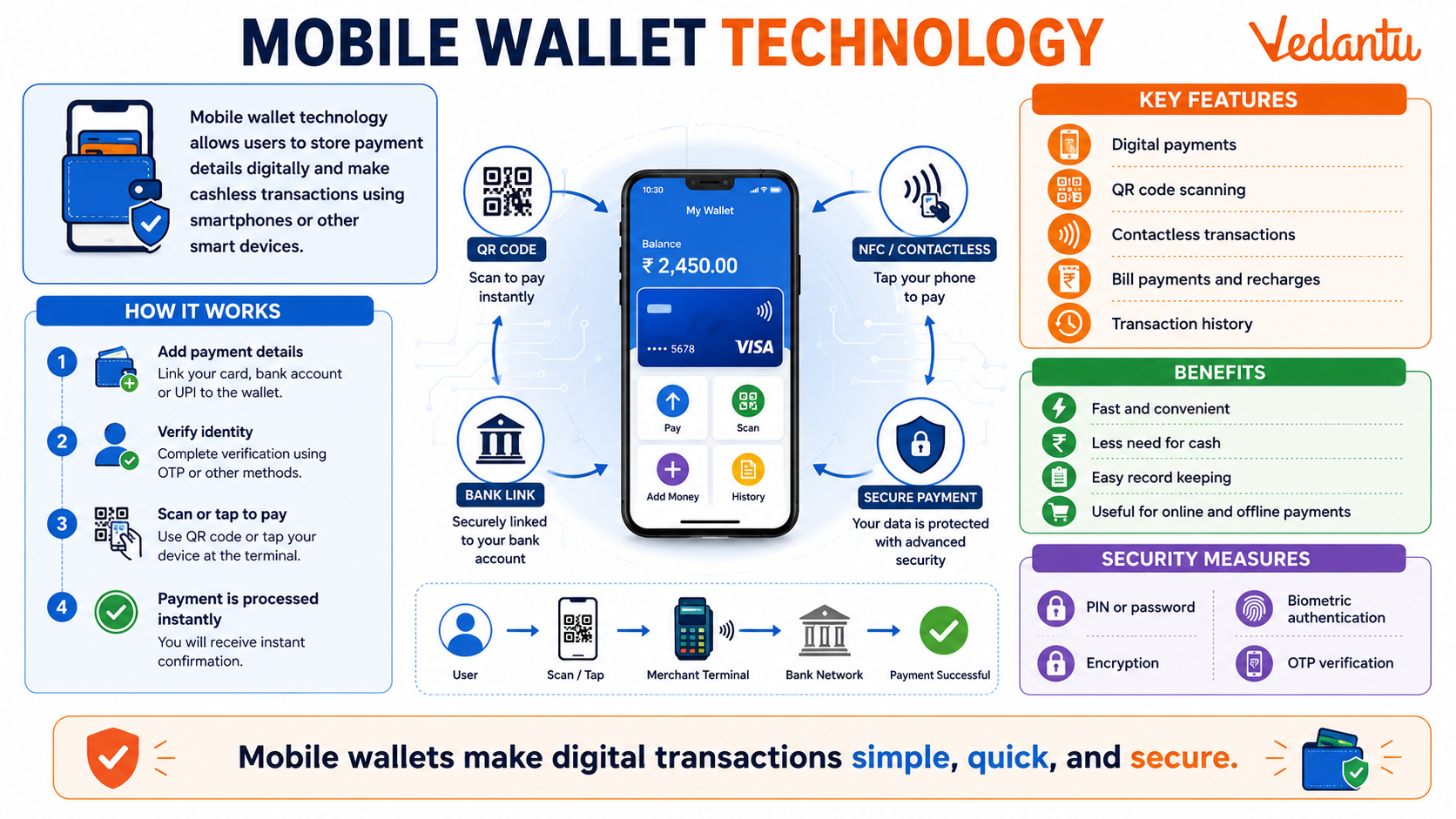
A Mobile Wallet is a digital payment system that allows users to store money electronically and make transactions using a smartphone or other mobile device. It is a type of electronic wallet that enables cashless payments for shopping, bill payments, ticket bookings, money transfers, and more. Mobile wallets have become an essential part of modern digital economies, promoting convenience, speed, and financial inclusion. With the rise of smartphones and internet connectivity, mobile wallets are transforming how people handle financial transactions.
What is a Mobile Wallet?
A mobile wallet is a virtual wallet that stores payment information securely on a mobile device. Users can link their bank accounts, debit cards, or credit cards to the wallet and use it for online and offline transactions. Instead of carrying physical cash or cards, individuals can pay directly through mobile applications using technologies like QR codes, Near Field Communication (NFC), or Unified Payments Interface (UPI).
Key Features of Mobile Wallets
- Digital storage of money and payment details.
- Quick and secure transactions using PIN, password, or biometric authentication.
- Bill payments such as electricity, water, mobile recharge, and DTH.
- Online shopping and in-store payments using QR codes.
- Instant money transfer between users.
- Transaction history and digital receipts for tracking expenses.
Types of Mobile Wallets
1. Closed Wallet
A closed wallet is issued by a company and can only be used for purchasing goods and services from that particular company. Refunds and cashback are stored within the wallet but cannot be withdrawn as cash.
2. Semi-Closed Wallet
A semi-closed wallet allows transactions at multiple merchants that have agreements with the wallet provider. However, users cannot withdraw cash from ATMs using this wallet.
3. Open Wallet
An open wallet is issued by banks or financial institutions. It allows users to make payments, transfer funds, and withdraw cash from ATMs.
Comparison of Types of Mobile Wallets
| Type of Wallet | Usage Area | Cash Withdrawal |
|---|---|---|
| Closed Wallet | Single company only | Not allowed |
| Semi-Closed Wallet | Multiple partnered merchants | Not allowed |
| Open Wallet | Wide usage including banks | Allowed |
The table above highlights the main differences between various types of mobile wallets based on usability and withdrawal features.
How Mobile Wallets Work
- Download the mobile wallet application from an app store.
- Register using a mobile number and complete verification.
- Link a bank account, debit card, or credit card.
- Add money to the wallet if required.
- Make payments by scanning QR codes or entering recipient details.
Advantages of Mobile Wallets
- Convenience and ease of use.
- Reduced need to carry physical cash.
- Secure transactions with encryption and authentication.
- Faster payments compared to traditional banking methods.
- Promotes digital economy and financial inclusion.
Disadvantages of Mobile Wallets
- Requires internet connectivity or smartphone access.
- Risk of cyber fraud if security measures are weak.
- Limited acceptance in remote or rural areas.
- Technical issues such as server downtime.
Security Measures in Mobile Wallets
Mobile wallets use advanced security features to protect user data and transactions. These include encryption technology, two-factor authentication, biometric verification like fingerprint or face recognition, and one-time passwords. Users are advised to keep their mobile devices secure and avoid sharing confidential information.
Importance of Mobile Wallets in the Digital Economy
Mobile wallets play a significant role in promoting cashless transactions and supporting digital payment ecosystems. They reduce dependency on physical currency, increase transparency in financial transactions, and help governments track economic activities more efficiently. In many countries, mobile wallets have enhanced financial inclusion by providing banking services to unbanked populations.
Conclusion
A mobile wallet is a modern financial tool that enables secure and convenient digital transactions through smartphones. It supports cashless payments, enhances financial accessibility, and strengthens the digital economy. Understanding mobile wallets is important for students and competitive exam aspirants, as digital payment systems are a key component of current economic and technological developments worldwide.
FAQs on Mobile Wallet Technology: Meaning, Uses, and Benefits
1. What is a Mobile Wallet?
A Mobile Wallet is a digital payment system that allows users to store money and make transactions using a smartphone. It works as an electronic alternative to cash or debit/credit cards.
• Stores digital money securely in an app
• Enables online payments, bill payments, and recharges
• Supports contactless payments using QR codes or NFC
• Linked to bank accounts, debit cards, or credit cards
It is also known as an e-wallet, digital wallet, or mobile payment app.
2. How does a Mobile Wallet work?
A Mobile Wallet works by storing payment information digitally and processing transactions through secure networks. Users load money into the wallet or link it to a bank account.
• Register using a mobile number
• Add money via bank transfer, UPI, or card
• Pay merchants using QR code scanning or NFC tap
• Transactions are verified using OTP, PIN, or biometric authentication
This system ensures fast, cashless, and secure transactions in both online and offline modes.
3. What are the types of Mobile Wallets?
Mobile Wallets are classified into closed, semi-closed, and open wallets based on usage and regulation. These categories are defined by financial authorities like the Reserve Bank of India (RBI).
• Closed Wallet: Used only with a specific company (e.g., shopping apps)
• Semi-Closed Wallet: Used at partnered merchants but no cash withdrawal
• Open Wallet: Allows purchases and cash withdrawal from ATMs
Understanding wallet types helps in choosing the right digital payment solution.
4. What are the advantages of using a Mobile Wallet?
Mobile Wallets offer convenience, speed, and enhanced security in digital transactions. They are widely used in modern cashless economies.
• Quick and easy payments
• Reduces need to carry cash
• Offers cashback and rewards
• Secure through encryption and PIN protection
• Useful for bill payments, ticket booking, and online shopping
These benefits make mobile wallets popular among students, professionals, and businesses.
5. Is a Mobile Wallet safe to use?
Yes, Mobile Wallets are generally safe as they use advanced security technologies. However, users must follow safety guidelines.
• Protected by encryption technology
• Requires OTP, PIN, or biometric verification
• Monitored under financial regulations
• Avoid sharing OTP or passwords
Safe usage ensures protection from cyber fraud, phishing, and unauthorized access.
6. What is the difference between Mobile Wallet and UPI?
A Mobile Wallet stores money digitally, while UPI directly transfers money between bank accounts. Both are popular digital payment methods.
• Mobile Wallet: Requires pre-loading money
• UPI (Unified Payments Interface): Direct bank-to-bank transfer
• Wallet may offer cashback and rewards
• UPI works 24/7 without storing money in an app
Both support cashless transactions and QR-based payments.
7. What are some popular Mobile Wallets?
Several Mobile Wallet apps are widely used for digital payments worldwide. These apps promote a cashless economy.
• Paytm
• PhonePe
• Google Pay
• Amazon Pay
• Apple Pay and Samsung Pay
These digital wallets support online transactions, bill payments, and contactless payments.
8. Can Mobile Wallets be used without internet?
Most Mobile Wallets require internet connectivity, but some offer limited offline features. Internet is usually needed for transaction verification.
• Online mode ensures real-time payment confirmation
• Some wallets allow offline QR storage
• SMS-based systems may work in limited cases
For smooth digital transactions, a stable internet connection is recommended.
9. What are the disadvantages of Mobile Wallets?
Despite many benefits, Mobile Wallets have certain limitations and risks. Users must be aware of these drawbacks.
• Risk of cyber fraud or hacking
• Requires smartphone and internet access
• Limited acceptance in some rural areas
• Transaction limits imposed by regulations
Proper awareness reduces risks in digital payment systems.
10. Why are Mobile Wallets important in a cashless economy?
Mobile Wallets play a key role in promoting a cashless and digital economy. They reduce dependency on physical currency and improve financial inclusion.
• Encourages digital transactions
• Increases financial transparency
• Supports government initiatives like Digital India
• Helps small businesses accept cashless payments
Thus, mobile wallets contribute to the growth of electronic payments and modern banking systems.
