









How Does The Process Of Downloading A File Work Step By Step
The process of downloading a file is a fundamental operation in computer science and everyday computing. It allows users to transfer data such as documents, images, software, videos, and other resources from a remote server to their local device through the internet or a network. Understanding how downloading works helps students learn about web browsers, servers, network protocols, and data transfer mechanisms. The process involves communication between client and server systems, data packets, storage management, and security considerations, making it an essential concept in networking and operating systems.
Definition and Meaning
The process of downloading a file in computer science refers to the method of transferring a file from a remote computer or server to a local device over a network.
- Download - Receiving data from a server to a local device.
- Server - A computer that stores and provides files or services to other computers.
- Client - The user device requesting the file.
- File Transfer Protocols - Rules such as HTTP, HTTPS, or FTP used for transferring files.
- Download dialog box - A window that asks where and how to save the file.
How It Works - Working Principle
The process of downloading a file working involves communication between the client and server using internet protocols. When a user clicks a download link, a request is sent to the server, which then responds by sending the file data in small units called packets.
- The user clicks a download link in a web browser or application.
- The browser sends a request to the server using HTTP or HTTPS.
- The server verifies the request and begins sending file data in packets.
- The client device receives and reassembles the packets in the correct order.
- The file is stored in the selected location on the local storage.
Below is an example of a download dialog box that appears before saving a file:

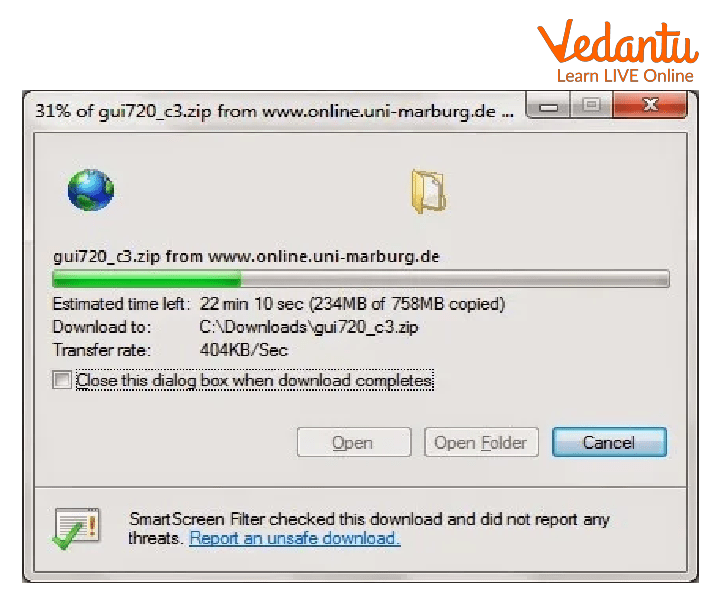
After confirmation, a progress dialog box shows the download status:
Types and Classification
The process of downloading a file types can be classified based on method and protocol.
- HTTP Download - Common method used by web browsers.
- HTTPS Download - Secure download using encryption.
- FTP Download - Used for transferring large files between systems.
- Peer to Peer Download - Files are downloaded from multiple users instead of a central server.
- Direct Download - File is downloaded directly from a link.
- Streaming Download - Data is played while being downloaded.
Components and Structure
Several components are involved in the process of downloading a file in computer science.
- Client Device - Computer, smartphone, or tablet requesting the file.
- Web Browser or Application - Software used to initiate and manage downloads.
- Server - Stores and sends the requested file.
- Internet Protocols - HTTP, HTTPS, FTP for communication.
- Local Storage - Hard disk, SSD, or memory where the file is saved.
Features and Characteristics
- Uses client server communication model.
- Transfers data in small packets.
- Supports pause and resume options in modern browsers.
- May include encryption for security.
- Displays progress indicators and estimated time remaining.
Advantages
- Allows access to digital resources anytime.
- Supports large file transfers over long distances.
- Secure downloads through HTTPS encryption.
- Files can be stored permanently for offline use.
Disadvantages / Limitations
- Slow internet speed increases download time.
- Risk of downloading malicious files.
- Large files consume storage space.
- Interrupted connections may corrupt incomplete downloads.
Applications and Use Cases
- Downloading software updates and applications.
- Saving study materials, PDFs, and assignments.
- Downloading multimedia files such as songs and videos.
- Retrieving data backups from cloud storage.
- Accessing open source tools and development resources.
Quick Facts About The Process Of Downloading A File
| Category | Details | Example |
|---|---|---|
| Type | Network Data Transfer | HTTP Download |
| Protocols Used | HTTP, HTTPS, FTP | Secure Web Download |
| Used For | Receiving files from servers | Downloading PDF |
These quick facts summarize essential information about the process and its role in computer networking.
Interesting Facts About The Process Of Downloading A File
- Download speed is usually measured in Mbps or MBps.
- HTTPS encrypts data to prevent interception.
- Modern browsers allow background downloads.
- Large downloads can be resumed if interrupted.
- Download managers improve speed using parallel connections.
- Cloud storage platforms depend heavily on file download systems.
Conclusion
The process of downloading a file is a key concept in computer science that connects networking, storage, and communication technologies. It enables users to access and store digital resources efficiently from remote servers. Understanding its working, types, features, and limitations helps students grasp how data transfer occurs over the internet. As digital communication continues to grow, mastering this concept becomes essential for safe and effective use of modern computing systems.
FAQs on The Process Of Downloading A File in Computer Networks
1. What is the process of downloading a file in computer networks?
The process of downloading a file is the transfer of data from a remote server to a local device over the internet or a network.
- Involves a client-server model
- Uses network protocols like HTTP, HTTPS, FTP
- Stores the file in local storage such as HDD, SSD, or mobile memory
2. How does the file downloading process work step by step?
The file downloading process works through a sequence of request, response, and data transfer between client and server systems.
- User sends a request via a web browser or application
- Server processes the request and sends file data in packets
- Client device reassembles packets and saves the file locally
3. Which network protocols are used in the process of downloading a file?
File downloading commonly uses standardized network protocols to ensure secure and reliable data transmission.
- HTTP/HTTPS for web downloads
- FTP/SFTP for file transfer operations
- BitTorrent protocol for peer-to-peer downloading
4. What are the main components involved in downloading a file?
The process of downloading a file involves both hardware and software components working together.
- Client device such as computer or smartphone
- Server hosting the file
- Network infrastructure including routers and ISPs
- Operating system and browser managing file storage
5. What is the difference between downloading and uploading a file?
Downloading transfers data from server to client, while uploading transfers data from client to server.
- Download example: saving a PDF from a website
- Upload example: sending a file to cloud storage
- Both use similar network protocols but opposite data flow direction
6. What factors affect the speed of downloading a file?
Download speed depends on network bandwidth, latency, and server performance.
- Internet speed provided by ISP
- Server load and response time
- File size and network congestion
- Type of connection such as Wi-Fi, Ethernet, or mobile data
7. How does a web browser manage file downloads?
A web browser manages file downloads using built-in download managers integrated with the operating system.
- Handles HTTP/HTTPS requests
- Displays progress and estimated time
- Stores files in a default or user-selected directory
- Performs basic security checks
8. What security risks are involved in downloading files?
Downloading files from untrusted sources can expose systems to cybersecurity threats such as malware and phishing attacks.
- Risk of viruses, ransomware, spyware
- Possibility of corrupted or modified files
- Use of HTTPS and antivirus software improves safety
9. What is the role of packets in the process of downloading a file?
During downloading, a file is divided into small units called packets for efficient network transmission.
- Packets travel independently through the network
- Each packet contains header and payload data
- Client system reassembles packets in correct order
10. Why is the process of downloading a file important for students and exam preparation?
Understanding the process of downloading a file is important for computer networks, operating systems, and cybersecurity concepts in exams and interviews.
- Common topic in school and college Computer Science
- Relevant for competitive exams like technical entrance tests
- Helps in understanding client-server architecture and data communication
