








Types and Features of Images Explained for Students
The characteristics of an image describe fundamental properties such as nature, size, orientation, and position, as formed by mirrors, lenses, or optical devices. These properties determine how an image appears relative to the original object and are essential for understanding image formation principles in optics, which are central topics for examinations such as JEE Main.
Fundamental Characteristics of an Image
The primary characteristics of an image formed by any optical instrument include nature (real or virtual), size (magnified, diminished, or same as object), orientation (upright or inverted), position (distance with respect to optical device), and lateral inversion. These properties vary based on the type of mirror, lens, and the location of the object.
Nature of the Image: Real and Virtual
Images can be classified as real or virtual. A real image forms when light rays actually converge at a point after reflection or refraction, and can be projected onto a screen. A virtual image is formed when light rays appear to diverge from a point behind the optical surface and cannot be projected onto a screen.
| Characteristic | Description |
|---|---|
| Real Image | Formed when rays converge; can be obtained on screen |
| Virtual Image | Formed when rays appear to diverge; cannot be projected |
In the context of mirrors and lenses, a plane mirror always forms a virtual image, whereas spherical mirrors and lenses can form both real and virtual images depending on the object's position. For detailed sign conventions see Sign Convention of Lens and Mirror.
Size of the Image
The size of an image compared to the object can be the same, magnified, or diminished. The magnification ($m$) of the image is mathematically given by
$m = \dfrac{\text{height of image}}{\text{height of object}} = \dfrac{h'}{h}$
A magnified image is larger than the object ($m>1$), a diminished image is smaller ($m<1$), and if $m=1$, the image is of the same size as the object. The image size depends on the object’s position relative to the optical device. More details are provided in Mirror Formula and Magnification.
Orientation (Direction) of the Image
Orientation describes whether the image is upright (erect) or inverted with respect to the object. Plane mirrors form upright (erect) images. Concave mirrors and convex lenses can form inverted images if the object is outside the focal length. Convex mirrors and concave lenses consistently form erect images.
Position of the Image
Image position refers to the location of the image with respect to the optical device. For a plane mirror, the image is formed at the same distance behind the mirror as the object is in front. For curved mirrors and lenses, image position varies with the object’s distance and is determined by the mirror or lens formula.
Lateral Inversion
Lateral inversion refers to the interchange of the left and right sides in the image formed by a plane mirror. This property is characteristic of plane mirrors and is often observed when reading text in a mirror. This effect is not observed in images formed by lenses.
Image Characteristics by Different Optical Devices
The nature and properties of images vary depending on the type of optical device used. The following sections detail the characteristics of images formed by plane mirrors, concave mirrors, convex mirrors, convex lenses, concave lenses, and a pinhole camera.
Characteristic of Image Formed by Plane Mirror
A plane mirror always produces a virtual, erect image of the same size as the object, formed at the same perpendicular distance behind the mirror, and exhibits lateral inversion.
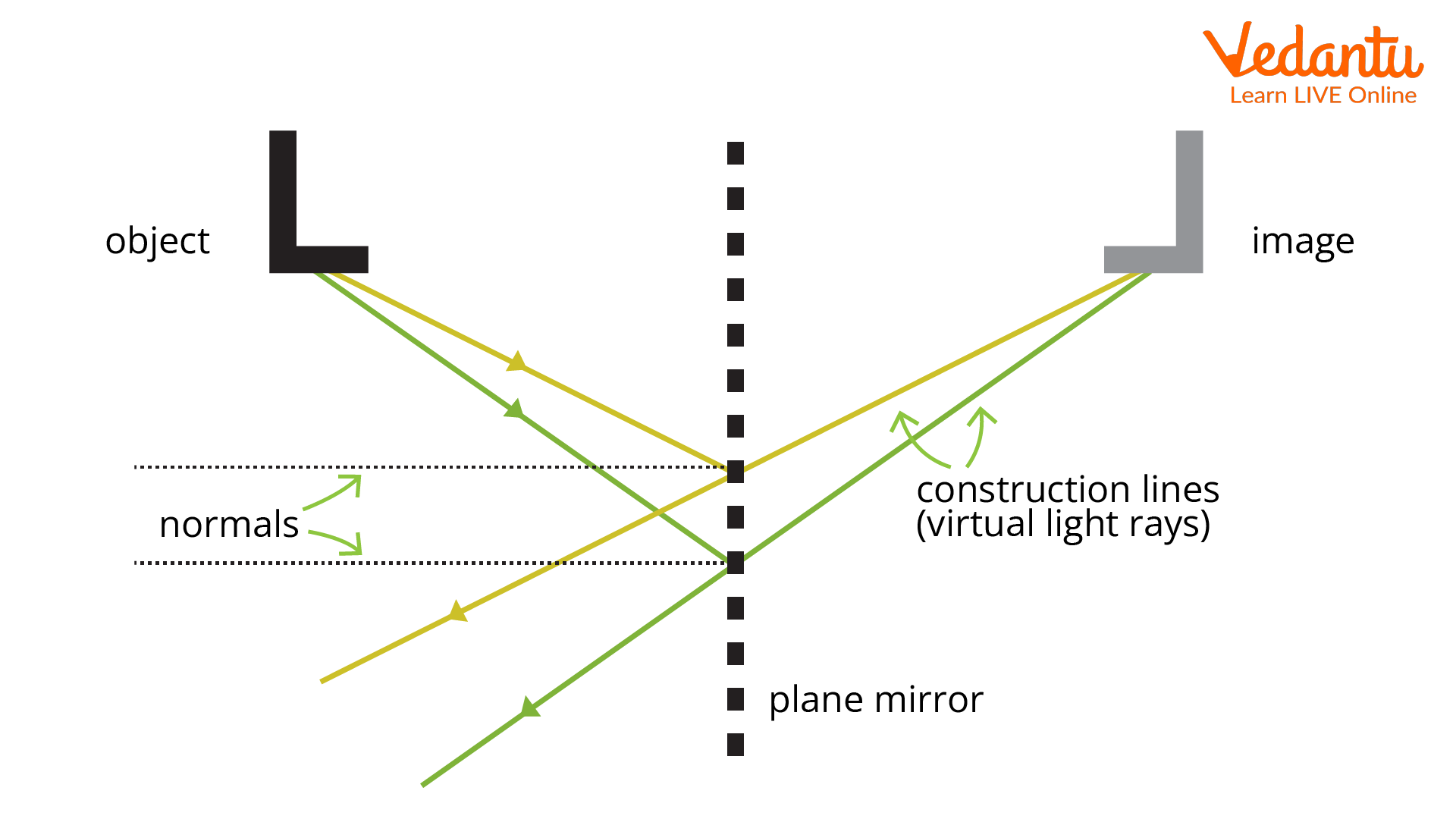
- Image always virtual and erect
- Image size equals the object size
- Same distance behind mirror as object is in front
- Lateral inversion present
Characteristic of Image Formed by Concave Mirror
A concave mirror can form both real and virtual images. The nature of the image depends on the position of the object relative to the pole ($P$), focus ($F$), and centre of curvature ($C$).
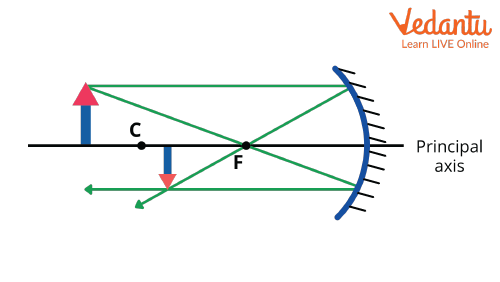
- Image real and inverted if object is beyond $F$
- Virtual and erect if object is between $P$ and $F$
- Image may be magnified or diminished
- Image position varies with object distance
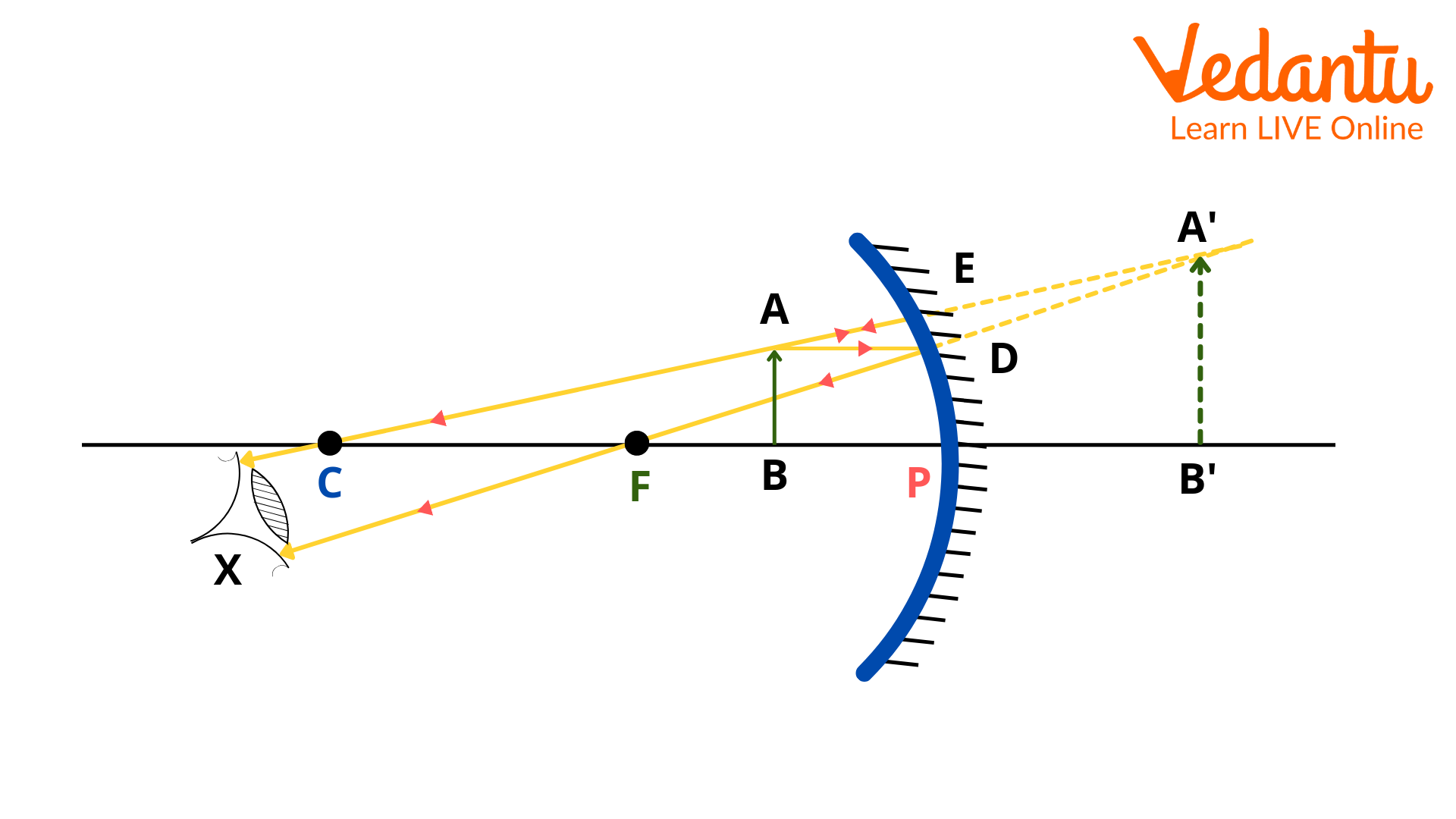
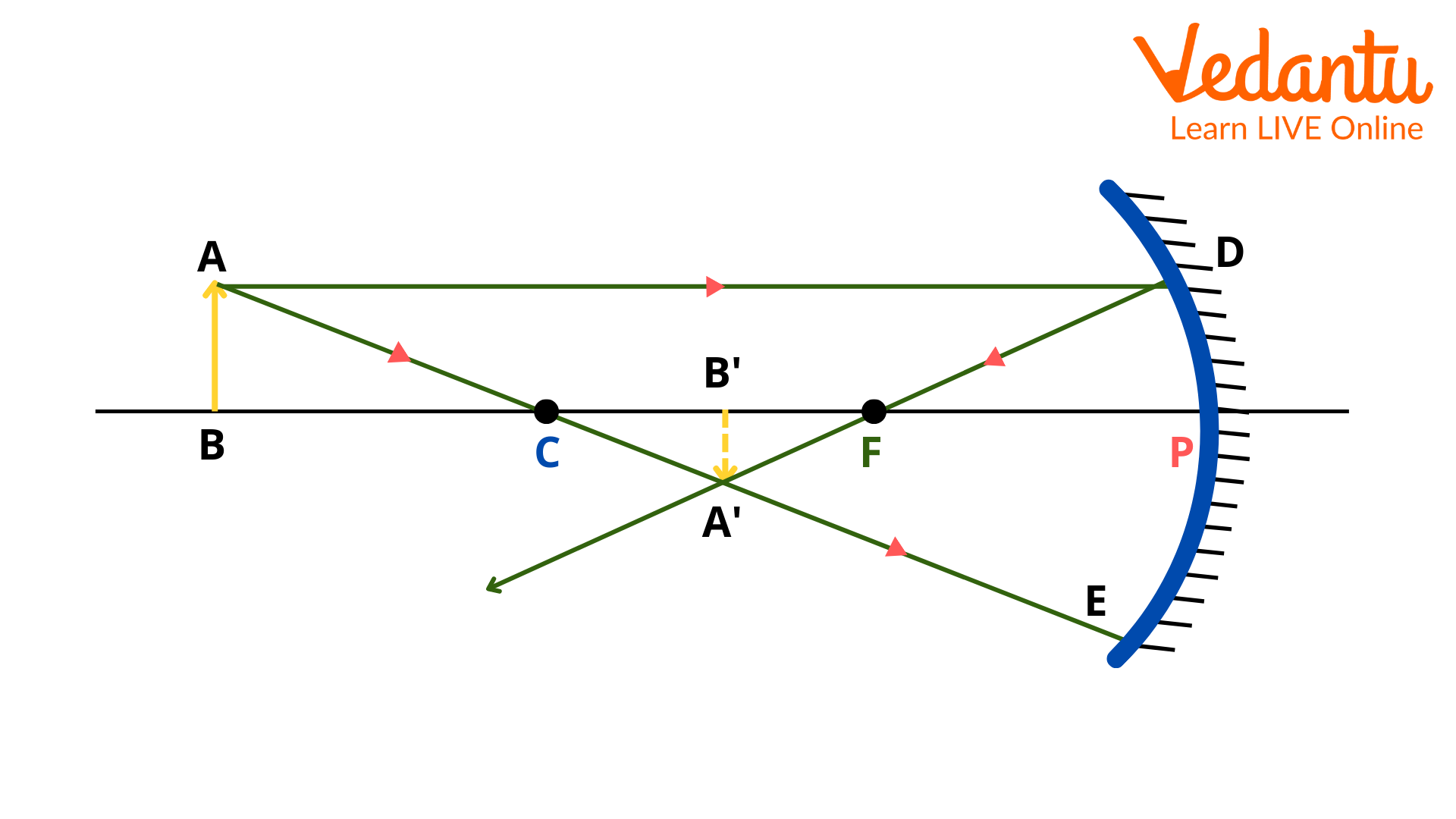
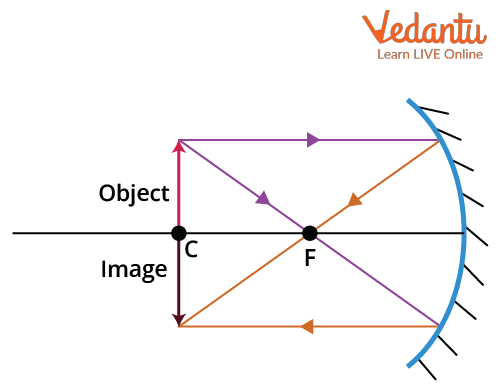
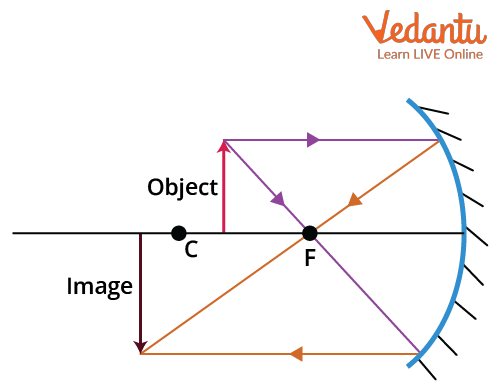
The specific nature, orientation, and size of the image can be summarized in a table as follows:
| Object Position | Image Characteristics |
|---|---|
| At infinity | Real, inverted, point-sized at focus |
| Beyond $C$ | Real, inverted, diminished, between $F$ and $C$ |
| At $C$ | Real, inverted, same size, at $C$ |
| Between $C$ and $F$ | Real, inverted, magnified, beyond $C$ |
| At $F$ | Real, inverted, highly magnified, at infinity |
| Between $F$ and $P$ | Virtual, erect, magnified, behind mirror |
Characteristic of Image Formed by Convex Mirror
Convex mirrors always produce images that are virtual, erect, and diminished irrespective of the distance of the object from the mirror. The images are always formed behind the mirror.
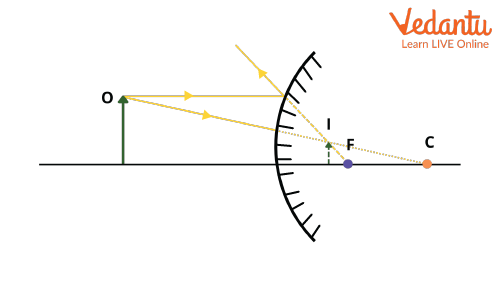
- Image always virtual and erect
- Always diminished in size
- Formed behind the mirror
Convex mirrors are commonly used as rear-view mirrors due to their wide field of view and ability to produce smaller images. For more applications and differences, refer to Difference Between Mirror and Lens.
Characteristic of Image Formed by Convex Lens
A convex lens can produce both real, inverted images and virtual, erect images. The characteristics depend upon the position of the object with respect to the lens’s principal focus and the center of curvature.
- Real and inverted when object is beyond focus
- Virtual and erect when object is within focal length
- Image may be magnified or diminished
- Image position varies with object distance
Characteristic of Image Formed by Concave Lens
A concave lens always forms a virtual, erect, and diminished image, regardless of the position of the object. The image is located between the lens and the object.
- Image always virtual and erect
- Always diminished in size
- Located on the same side as object
Characteristic of Image Formed by a Pinhole Camera
A pinhole camera forms a real, inverted, and diminished image on the screen. The size and sharpness depend on the distance between the pinhole and the screen as well as the distance to the object. The image characteristics are consistent due to rectilinear propagation of light.
Summary Table: Image Properties Across Optical Devices
| Optical Device | Image Characteristic |
|---|---|
| Plane mirror | Virtual, erect, same size, laterally inverted |
| Concave mirror | Real/virtual (depends on object), can be magnified/inverted/diminished |
| Convex mirror | Virtual, erect, diminished |
| Convex lens | Real/inverted or virtual/erect, magnified/diminished |
| Concave lens | Virtual, erect, diminished |
| Pinhole camera | Real, inverted, diminished |
The comprehensive understanding of image characteristics is essential to solve advanced optics problems in competitive examinations. These properties enable students to analyse image formation under varying conditions. Related concepts and detailed chapters can be found at Characteristic of Image.


FAQs on What Are the Main Characteristics of an Image?
1. What are the main characteristics of an image?
The main characteristics of an image include its resolution, color depth, dimensions, file format, and compression technique. Important points to remember are:
- Resolution: The clarity and detail, usually in pixels (e.g., 1920x1080).
- Color Depth: Number of bits per pixel determining the image's color range.
- Dimensions: Width and height, typically in pixels or inches.
- File Format: Types like JPEG, PNG, GIF, BMP, which affect usage and quality.
- Compression: Lossless (e.g., PNG) or lossy (e.g., JPEG) for reducing file size while managing quality.
2. What is image resolution?
Image resolution is the amount of detail in an image, measured by the number of pixels in width and height.
- A higher resolution means sharper and more detailed images.
- Commonly expressed as Width x Height (e.g., 1024x768 pixels).
- Directly affects print quality and digital display clarity.
3. What is color depth in an image?
Color depth refers to the number of bits used to represent the color of a single pixel.
- Higher color depth provides more colors and detail.
- Common values are 8-bit (256 colors), 16-bit (65,536 colors), and 24-bit (16.7 million colors).
4. How do file formats affect images?
File formats determine how an image is saved and displayed on various devices.
- JPEG: Good for photos, uses lossy compression, smaller file size, some quality loss.
- PNG: Lossless compression, supports transparency, best for graphics.
- GIF: Limited colors, supports animation, used for simple graphics.
- BMP: Uncompressed, high quality, large file size.
5. What is the difference between raster and vector images?
Raster images are made up of pixels, while vector images are drawn using mathematical lines and shapes.
- Raster: Can become pixelated when scaled (e.g., JPEG, PNG).
- Vector: Scalable without losing quality (e.g., SVG, EPS).
6. What is image compression and why is it important?
Image compression reduces the file size of images for storage and transmission.
- Lossless compression (e.g., PNG) keeps all data intact.
- Lossy compression (e.g., JPEG) removes some data, reducing quality for smaller size.
- Compression helps websites load faster and saves storage space.
7. List and explain the features of a digital image.
The features of a digital image include:
- Pixels: Smallest unit representing image detail.
- Resolution: Clarity and sharpness based on pixel count.
- Color Depth: Number of colors displayable per pixel.
- File Format: Structure for storing the image data.
- Compression: Method to reduce file size.
- Aspect Ratio: Ratio of width to height (e.g., 16:9).
8. What are the two types of image compression?
Image compression is of two main types: Lossless and Lossy.
- Lossless Compression: No loss of data, original image can be perfectly reconstructed (used in PNG, BMP).
- Lossy Compression: Some data lost, smaller file size, minor loss of image quality (used in JPEG).
9. Why is image resolution important in computer applications?
Image resolution is important in computer applications because it affects the display, print quality, and user experience.
- Higher resolution provides better clarity for digital screens and prints.
- Low resolution can cause blurry or pixelated images.
- Choosing the right resolution is crucial for web, print, and multimedia projects.
10. What are the characteristics of bitmap images?
Bitmap images are composed of a grid of individual pixels, each with its own color.
- Fixed resolution: Do not scale well and may appear pixelated when enlarged.
- Color depth: Determines the number of colors each pixel can display.
- Common formats: BMP, PNG, JPEG.
11. What is the aspect ratio of an image?
Aspect ratio is the proportional relationship between an image's width and height.
- Expressed as Width : Height (e.g., 4:3, 16:9).
- Determines how an image fits on screens or prints.
