









How Cascading Order Works in CSS with Specificity and Inheritance Rules
In web development, multiple CSS rules can apply to the same HTML element at the same time. The browser must decide which rule should take priority. This decision-making process is known as Cascading Order. Understanding cascading order in computer science is essential for designing well-structured and predictable web pages. It helps developers control styles effectively, avoid conflicts, and maintain clean code. By learning how CSS resolves conflicts using specific rules and priorities, students can create consistent and responsive user interfaces.
Definition and Meaning
Cascading Order refers to the sequence in which the browser applies CSS rules when multiple rules target the same HTML element. The term "cascading" describes how styles flow from different sources and override each other based on defined priorities.
- CSS - Cascading Style Sheets used to style web pages.
- Specificity - A weight system that determines which selector is stronger.
- Inheritance - Some properties are passed from parent elements to child elements.
- Importance - The !important rule that overrides normal priority.
How It Works - Working Principle
The cascading order working is based on a hierarchy of rules. When multiple styles apply to the same element, the browser evaluates them in a specific order to determine which one should be used.
- Importance - Rules marked with
!importantoverride all normal rules. - Origin - Browser default styles, external stylesheets, internal styles, and inline styles are considered.
- Specificity - More specific selectors override less specific ones.
- Source Order - If specificity is equal, the rule declared last is applied.
This step-by-step evaluation ensures consistent styling even when multiple CSS rules conflict.
Types and Classification
Cascading order is influenced by different types of CSS styles based on where and how they are written.
Types of CSS Affecting Cascading Order
| Type | Description | Priority Level |
|---|---|---|
| Inline CSS | Written inside HTML elements using style attribute | Highest among normal rules |
| Internal CSS | Written inside <style> tag in HTML | Medium |
| External CSS | Written in separate .css file | Lower than inline |
| Browser Default | Default styles applied by browser | Lowest |
These CSS types combine with specificity and importance rules to determine the final style of an element.
Syntax and Example
Syntax
selector {
  property: value;
}
Example
<style>
p {
  color: blue;
}

.text {
  color: green;
}

#unique {
  color: red;
}
</style>

<p id="unique" class="text">Hello World</p>
In this cascading order example, the paragraph text will appear red because the ID selector has higher specificity than class and element selectors.
Rules of Cascading
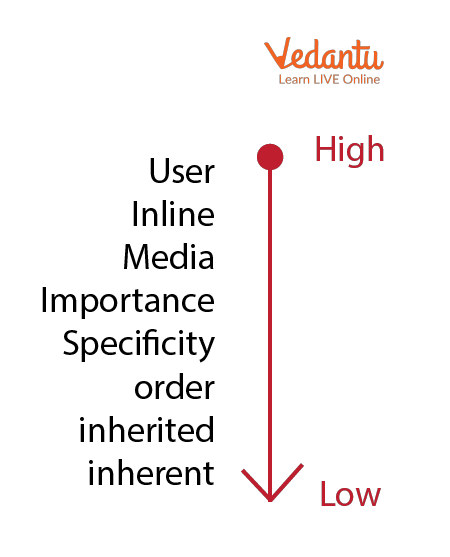
The following image explains the rules that determine cascading priority:
Determining the Cascading Order
The process of determining cascading order involves checking importance, origin, specificity, and source order.
Grouping of Selectors
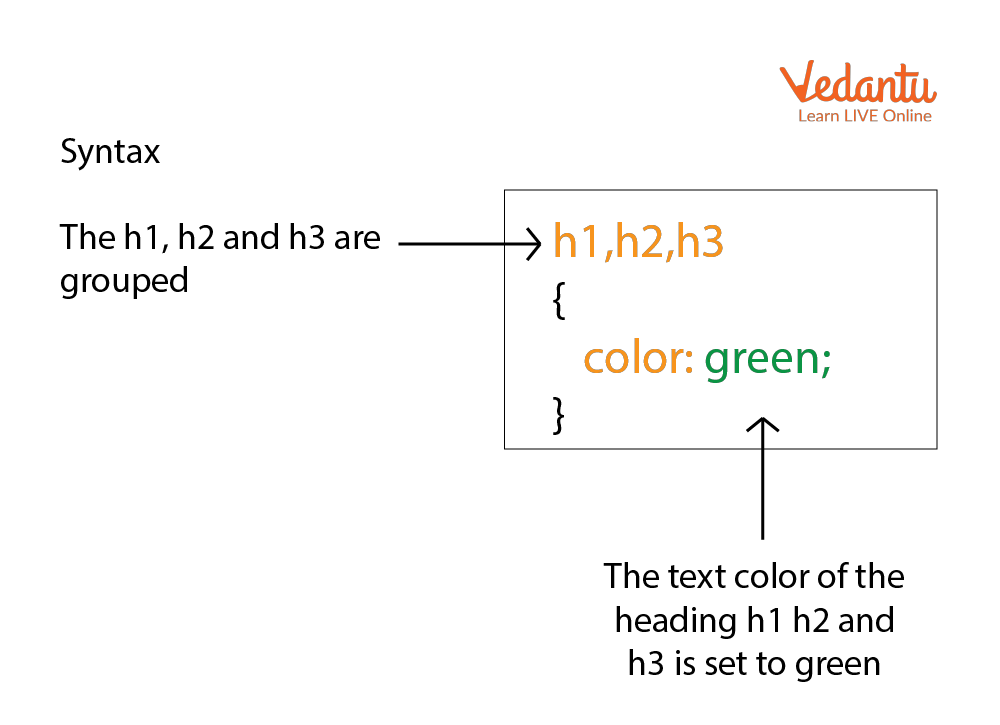
CSS allows grouping multiple selectors to apply the same style rule. This improves readability and avoids repetition.
Features and Characteristics
- Follows a clear priority hierarchy system.
- Uses specificity calculation to resolve conflicts.
- Supports inheritance of certain properties.
- Allows overriding using !important.
- Ensures consistent styling across large projects.
Advantages
- Provides structured conflict resolution.
- Improves maintainability of CSS code.
- Supports modular and reusable design.
- Reduces redundancy through grouping selectors.
Disadvantages / Limitations
- Can be confusing for beginners.
- Overuse of !important can make debugging difficult.
- High specificity selectors reduce flexibility.
Applications and Use Cases
- Designing responsive websites.
- Managing large scale web applications.
- Creating theme based styling systems.
- Maintaining consistent UI components.
Quick Facts About Cascading Order
| Category | Details |
|---|---|
| Field | Web Development |
| Related Language | CSS |
| Key Principle | Importance, Specificity, Source Order |
| Used For | Resolving style conflicts |
These quick facts summarize essential details about cascading order in computer science.
Interesting Facts About Cascading Order
- The word "cascading" represents how styles flow from multiple sources.
- ID selectors are more specific than class selectors.
- Inline styles override external stylesheets.
- The !important rule can override even highly specific selectors.
- Browser developer tools help visualize specificity and applied styles.
- Cascading order is a core concept in mastering CSS.
Conclusion
Understanding Cascading Order is essential for mastering CSS and web development. It defines how style conflicts are resolved using importance, origin, specificity, and source order. By learning cascading order definition, types, working, and examples, students can build well-structured and visually consistent websites. This concept plays a vital role in front-end development and helps developers maintain scalable and maintainable design systems.


FAQs on Cascading Order in CSS with Priority and Specificity
1. What is Cascading Order in CSS?
The Cascading Order in CSS is the rule system that determines which style is applied when multiple CSS rules target the same HTML element.
- It resolves conflicts between multiple CSS declarations.
- It follows priority rules such as importance, specificity, and source order.
2. Why is Cascading Order important in web development?
The Cascading Order is important because it ensures the correct CSS style is applied in a web page when multiple rules exist.
- Helps developers control layout and design efficiently.
- Prevents unexpected styling conflicts in large web applications.
3. What are the main rules that define Cascading Order in CSS?
The Cascading Order is determined by importance, specificity, and source order in CSS.
- !important declarations override normal rules.
- Specificity decides priority based on selector type.
- Source order applies the last declared rule if specificity is equal.
4. How does specificity affect Cascading Order?
In the Cascading Order, specificity calculates which CSS selector has higher priority.
- Inline styles have highest specificity.
- ID selectors override class and element selectors.
- Class selectors override element selectors.
5. What is the role of !important in Cascading Order?
The !important rule overrides normal CSS declarations in the Cascading Order.
- It gives highest priority to a CSS property.
- Should be used carefully to avoid maintainability issues.
6. How does source order influence Cascading Order?
In the Cascading Order, if two selectors have equal specificity, the rule written later in the CSS file is applied.
- Applies when importance and specificity are the same.
- Encourages organized and structured CSS coding practices.
7. What is the difference between inheritance and Cascading Order?
While Cascading Order resolves style conflicts, inheritance allows child elements to inherit certain CSS properties from their parent.
- Cascading handles conflicting rules.
- Inheritance passes properties like font and color automatically.
8. How does Cascading Order work with inline, internal, and external CSS?
The Cascading Order prioritizes inline, internal, and external CSS based on specificity and placement.
- Inline CSS has highest priority.
- Internal and external CSS follow depending on specificity and load order.
9. What are common mistakes related to Cascading Order?
Common mistakes in understanding Cascading Order lead to unexpected styling issues in web development.
- Overusing !important declarations.
- Ignoring selector specificity rules.
- Not checking CSS file loading order.
10. Is Cascading Order important for exams and front-end developer interviews?
Yes, understanding Cascading Order is essential for web development exams, coding interviews, and front-end development roles.
- Frequently asked in HTML and CSS interview questions.
- Important for debugging CSS in real-world projects.
