









What are Class Selectors in CSS and How Do They Work
In web development, styling multiple elements efficiently is essential for building clean and consistent user interfaces. Class Selectors in CSS provide a powerful way to apply the same style to multiple HTML elements without repeating code. They are widely used in modern websites to control layout, colors, fonts, spacing, and responsiveness. Understanding Class Selectors in computer science and web technologies helps students create reusable, maintainable, and scalable web designs. They form a core concept in CSS and play a vital role in frontend development.
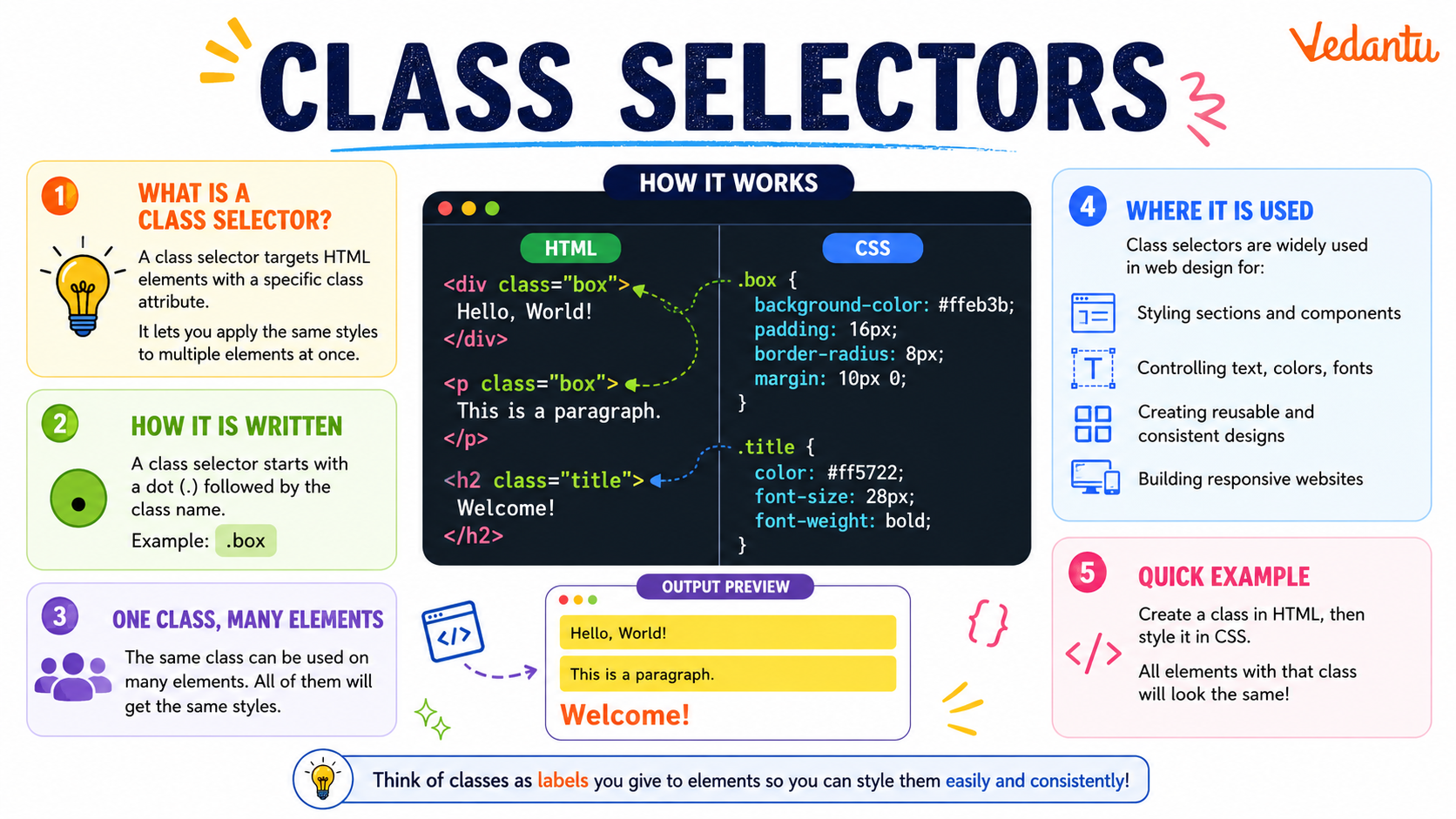
Definition and Meaning
Class Selectors are a type of CSS selector used to target HTML elements that share the same class attribute. They allow developers to apply common styles to multiple elements efficiently.
- Class attribute - An HTML attribute used to assign a name to an element.
- Class selector - A CSS selector that begins with a dot (.) followed by the class name.
- Reusable styling - The ability to apply the same style to multiple elements.
- CSS - Cascading Style Sheets used to style HTML documents.
How It Works - Working Principle
The working of Class Selectors is based on matching the class name defined in CSS with the class attribute assigned to HTML elements. When the browser loads a webpage, it scans the HTML structure and applies CSS rules to matching elements.
- A class name is defined in the CSS file using a dot followed by the class name.
- The same class name is assigned to one or more HTML elements using the class attribute.
- The browser matches the class selector with elements having that class name.
- The defined styles are applied to all matching elements.
This mechanism makes Class Selectors highly flexible and suitable for styling groups of elements across a webpage.
Types and Classification
Class Selectors can be categorized based on how they are used in CSS.
- Single Class Selector - Targets elements with one specific class. Example: .box
- Multiple Class Selector - Applies styles to elements having multiple classes. Example: .box.highlight
- Class with Element Selector - Targets a specific element with a specific class. Example: p.note
- Combined Class Selector - Uses more than one class in a single rule to refine styling.
Syntax and Example
General Syntax
.classname {
    property: value;
}
Example
<!DOCTYPE html>
<html>
<head>
<style>
.highlight {
    color: blue;
    font-weight: bold;
}
</style>
</head>
<body>

<p class="highlight">This is a highlighted paragraph.</p>
<p>This is a normal paragraph.</p>

</body>
</html>
In this Class Selectors example, only the paragraph with the class "highlight" is styled in blue and bold. The second paragraph remains unaffected because it does not have the class attribute.
Features and Characteristics
- Reusable styling across multiple elements.
- Improves code readability and organization.
- Can be combined with other selectors.
- Supports multiple classes on a single element.
- Works with all HTML elements.
Advantages
- Reduces repetition in CSS code.
- Enhances maintainability of web pages.
- Makes styling flexible and scalable.
- Useful for large and dynamic websites.
Disadvantages / Limitations
- Overuse can make CSS difficult to manage.
- Naming conflicts may occur in large projects.
- Requires consistent naming conventions.
Applications and Use Cases
- Styling buttons, forms, and navigation menus.
- Creating responsive layouts.
- Applying themes and design systems.
- Building reusable UI components.
- Frontend development in frameworks like Bootstrap and React.
Quick Facts About Class Selectors
| Category | Details | Usage |
|---|---|---|
| Type | CSS Selector | Used in Web Styling |
| Symbol | Dot (.) | Before class name |
| Applies To | Multiple Elements | Reusable Styling |
These quick facts summarize the essential properties of Class Selectors in computer science and web development.
Class Selector vs ID Selector
| Feature | Class Selector | ID Selector |
|---|---|---|
| Symbol | . | # |
| Uniqueness | Can be used multiple times | Used only once per page |
| Reusability | Reusable | Not reusable |
Class Selectors are ideal for reusable styles, whereas ID selectors are meant for unique elements within a webpage.
Interesting Facts About Class Selectors
- An HTML element can have multiple classes separated by spaces.
- Class names are case-sensitive in XHTML but generally case-insensitive in HTML.
- They play a major role in CSS frameworks like Bootstrap.
- Class Selectors support advanced combinations with pseudo-classes.
- They improve modular design in web development.
- Modern JavaScript often selects elements using class names.
Conclusion
Class Selectors are a fundamental concept in CSS that enable efficient and reusable styling of web elements. By allowing multiple elements to share the same design rules, they simplify web development and improve maintainability. Understanding Class Selectors definition, working, types, and applications is essential for anyone learning frontend development. They contribute significantly to structured, scalable, and professional website design in computer science and web technologies.


FAQs on Class Selectors in CSS with Syntax and Examples
1. What is a Class Selector in CSS?
Class Selector in CSS is used to select and style HTML elements that share the same class attribute.
- Defined using a dot (.) followed by the class name
- Allows styling multiple elements with a single rule
- Commonly used in web development for reusable design
2. What is the syntax of a Class Selector in CSS?
The syntax of a Class Selector starts with a dot (.) followed by the class name and CSS properties inside curly braces.
- Syntax: .classname { property: value; }
- Example: .highlight { color: red; }
- Applied using the class attribute in HTML
3. How do Class Selectors work in web development?
A Class Selector works by matching HTML elements that contain a specific class attribute and applying defined CSS styles to them.
- Browser scans HTML for matching class names
- Applies the defined CSS styling rules
- Can target multiple elements across a webpage
4. What is the difference between Class Selector and ID Selector?
The main difference between a Class Selector and an ID Selector is that classes can be reused, while IDs must be unique.
- Class Selector uses .classname
- ID Selector uses #idname
- Classes can apply to multiple elements
- ID has higher specificity in CSS
5. Can multiple classes be applied to a single HTML element?
Yes, multiple Class Selectors can be applied to a single HTML element by separating class names with spaces.
- Example: <div class="box highlight">
- Each class adds its own styling rules
- Helps in modular and reusable CSS design
6. What are the advantages of using Class Selectors in CSS?
Class Selectors provide flexibility and reusability in styling web pages.
- Reusable across multiple HTML elements
- Improves code maintainability
- Supports modular web design
- Essential in frameworks like Bootstrap and Tailwind CSS
7. What are the limitations or disadvantages of Class Selectors?
Although powerful, Class Selectors can create complexity if not managed properly.
- Overuse may lead to messy CSS structure
- Lower specificity compared to ID selectors
- May cause conflicts in large projects without proper naming conventions
8. How does specificity affect Class Selectors in CSS?
In CSS, specificity determines which style rule is applied when multiple rules target the same element.
- Class Selectors have higher specificity than element selectors
- Lower specificity than ID selectors
- Specificity value for class is typically (0,1,0)
9. Can Class Selectors be combined with other selectors?
Yes, Class Selectors can be combined with element, ID, attribute, and pseudo-class selectors for precise targeting.
- Example: div.box { }
- Example: .menu:hover { }
- Used in advanced CSS styling and responsive web design
10. Why are Class Selectors important for exams and interviews?
Class Selectors are a fundamental concept in HTML and CSS and are frequently asked in web development exams and technical interviews.
- Tests understanding of CSS syntax and specificity
- Important for frontend development roles
- Forms the foundation for learning CSS frameworks and UI design
