









What Is the World Wide Web Architecture Components and Working Explained
The World Wide Web is one of the most important innovations in modern computer science. It allows people to access, share, and publish information across the globe using the Internet. From browsing websites and watching videos to online learning and e-commerce, the Web has transformed how we communicate and work. Understanding the Introduction to World Wide Web helps students grasp how websites function, how information travels, and how web technologies shape the digital world. It forms the foundation of web development, networking, and online communication systems.
Definition and Meaning
World Wide Web definition refers to a system of interlinked hypertext documents and resources that are accessed through the Internet using web browsers. It is often called the Web or WWW.
- World Wide Web - A collection of websites and web pages connected through hyperlinks.
- Website - A group of related web pages under a single domain name.
- Web Page - A single document on the Web written in HTML.
- Web Browser - Software used to access web pages, such as Chrome or Firefox.
- URL - Uniform Resource Locator, the address of a web page.
In simple words, the Web is a system that allows users to access information stored on web servers using the Internet.

How It Works - Working Principle
The World Wide Web working is based on the client-server model. A user requests information through a web browser, and the server responds by sending the required web page.
- The user enters a URL in a web browser.
- The browser sends a request to a web server using HTTP or HTTPS protocol.
- The server processes the request and finds the requested resource.
- The server sends the web page data back to the browser.
- The browser renders the page using HTML, CSS, and JavaScript.
This entire process happens within seconds, allowing seamless browsing.


Types and Classification
The World Wide Web can be classified into different types based on accessibility and usage.
- Surface Web - Publicly accessible websites indexed by search engines.
- Deep Web - Content not indexed by search engines, such as private databases.
- Dark Web - Encrypted part of the Web accessible using special software.
Components and Structure
The Web consists of several key components that work together.
- Web Browser - Displays web pages to users.
- Web Server - Stores and delivers web content.
- HTML - Markup language for creating web pages.
- HTTP/HTTPS - Communication protocols between client and server.
- DNS - Translates domain names into IP addresses.
Types of Internet Connections
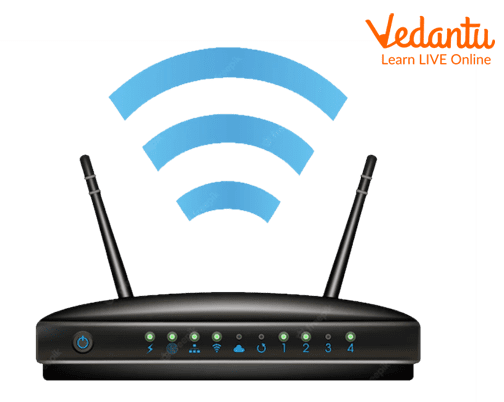
To access the World Wide Web, users need an Internet connection. Common types include:
- Dial Up Connection - Uses telephone lines and provides slow speed access.
- Broadband Connection - High speed Internet connection used widely today.

Features and Characteristics
- Hypertext based navigation.
- Multimedia support including text, images, audio, and video.
- Client server architecture.
- Global accessibility.
- Dynamic and interactive content.
Advantages
- Easy access to vast information.
- Supports online education and research.
- Enables global communication.
- Facilitates e-commerce and digital services.
Disadvantages / Limitations
- Security and privacy risks.
- Spread of misinformation.
- Dependence on Internet connectivity.
- Cyber threats such as phishing and malware.
Applications and Use Cases
- Education - Online classes and e-learning platforms.
- Business - E-commerce websites and online banking.
- Entertainment - Streaming services and online games.
- Communication - Email and social networking sites.
- Government services - Online portals for citizens.
Quick Facts About World Wide Web
| Category | Details | Notes |
|---|---|---|
| Inventor | Tim Berners Lee | 1989 |
| Protocol Used | HTTP / HTTPS | Communication standard |
| Main Language | HTML | Web page structure |
| Used For | Information sharing | Global communication |
These quick facts summarize the key points about the Introduction to World Wide Web in computer science.
Comparison Between Internet and World Wide Web
| Internet | World Wide Web |
|---|---|
| Network of networks | Service running on the Internet |
| Uses IP protocol | Uses HTTP protocol |
| Provides connectivity | Provides information access |
The Internet is the infrastructure, while the Web is one of the services built on top of it.
Interesting Facts About World Wide Web
- The Web was invented in 1989 at CERN.
- The first website went live in 1991.
- HTML was the first language used to create web pages.
- There are billions of websites on the Web today.
- Search engines help users find information quickly.
- The Web supports multimedia content and interactive applications.
Conclusion
The Introduction to World Wide Web provides essential knowledge about how information is shared across the globe using web technologies. Understanding the World Wide Web in computer science helps students learn about browsers, servers, protocols, and web applications. It plays a major role in education, business, communication, and entertainment. Mastering the basics of the Web builds a strong foundation for further study in web development, networking, and digital technologies.


FAQs on Introduction To World Wide Web and How It Works
1. What is the World Wide Web (WWW)?
World Wide Web (WWW) is a global information system that allows users to access and share interlinked web pages over the Internet using web browsers.
- Developed by Tim Berners-Lee in 1989
- Works on top of the Internet infrastructure
- Uses HTTP/HTTPS protocols for communication
- Displays content through web browsers like Chrome and Firefox
2. How does the World Wide Web work?
The World Wide Web works on a client-server model where a web browser requests web pages from a web server using HTTP or HTTPS protocols.
- User enters a URL in a browser
- Browser sends a HTTP request to the server
- Server responds with HTML, CSS, and JavaScript files
- Browser renders the web page for the user
3. What are the main components of the World Wide Web?
The main components of the World Wide Web include technologies that enable communication, content creation, and resource identification.
- HTML for structuring web pages
- HTTP/HTTPS for data transfer
- URL for locating web resources
- Web browsers and web servers
4. What is the difference between the Internet and the World Wide Web?
The Internet is a global network of computers, while the World Wide Web is a service that operates on the Internet to access web pages.
- Internet is the infrastructure
- WWW is an application layer service
- Internet supports email, FTP, and cloud computing
- WWW specifically uses web technologies like HTTP and HTML
5. What is a URL in the World Wide Web?
A Uniform Resource Locator (URL) is the address used to access resources on the World Wide Web.
- Contains protocol (http or https)
- Includes domain name
- May specify path and query parameters
- Example: https://www.example.com
6. What are the types of websites on the World Wide Web?
Websites on the World Wide Web are mainly classified based on how their content is generated and delivered.
- Static websites with fixed HTML content
- Dynamic websites using databases and server-side programming
- E-commerce websites for online transactions
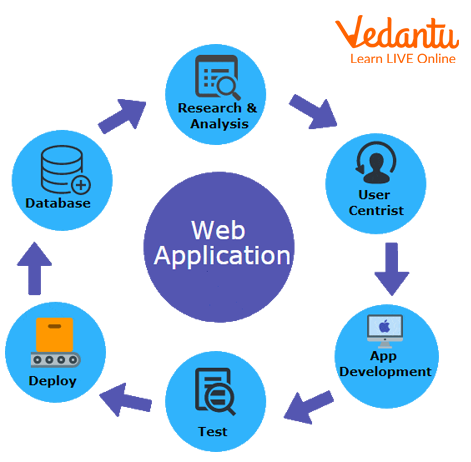
- Web applications like Gmail or Google Docs
7. What are the advantages and disadvantages of the World Wide Web?
The World Wide Web offers global information access but also raises security and privacy concerns.
- Advantages: easy information sharing, e-learning, e-commerce, global communication
- Supports web development, cloud computing, and online services
- Disadvantages: cybersecurity threats, misinformation, privacy risks
- Requires reliable Internet connectivity
8. What technologies are used to build the World Wide Web?
The World Wide Web is built using standard web development technologies for front-end and back-end systems.
- HTML for structure
- CSS for styling
- JavaScript for interactivity
- Web servers like Apache and Nginx
- Databases like MySQL and MongoDB
9. What is the role of HTTP and HTTPS in the World Wide Web?
HTTP and HTTPS are communication protocols that transfer data between web browsers and web servers on the World Wide Web.
- HTTP stands for HyperText Transfer Protocol
- HTTPS adds SSL/TLS encryption for security
- Ensures reliable data exchange
- Important for cybersecurity and secure web applications
10. Why is the World Wide Web important for students and exam preparation?
The World Wide Web is important in Computer Science education because it forms the foundation of web development, networking, and modern software systems.
- Common topic in school and college exams
- Important for competitive exams and interviews
- Essential for careers in web development and cloud computing
- Helps understand Internet architecture and networking concepts
