









What is Microsoft PowerPoint 2013 and how to use its features
Microsoft PowerPoint 2013 is a popular presentation software developed by Microsoft that allows users to create professional slideshows for educational, business, and personal use. It is a part of the Microsoft Office 2013 suite and is widely used in schools, colleges, and offices to present information in a clear and visual format. In computer science, Microsoft PowerPoint 2013 is important because it helps users understand digital presentation tools, multimedia integration, and user interface features. Learning PowerPoint improves communication skills and supports effective digital content creation.
Definition and Meaning
Microsoft PowerPoint 2013 is a presentation program that enables users to create slides containing text, images, charts, animations, audio, and video.
- Presentation - A collection of slides used to convey information.
- Slide - A single page of a presentation.
- Layout - The arrangement of content placeholders on a slide.
- Transition - Visual effect between slides.
- Animation - Movement effects applied to text or objects within a slide.
How It Works - Working Principle
The Microsoft PowerPoint 2013 working process is based on creating, editing, and presenting slides in a structured format. Users can insert multimedia elements and apply design features to enhance communication.
- Open PowerPoint and choose New Presentation or a template.
- Select a suitable Slide Layout for content arrangement.
- Insert text, images, charts, audio, or video using the Insert tab.
- Apply Transitions and Animations to enhance visual appeal.
- Run the presentation in Slide Show mode.
- Save the file with the extension .pptx.
Types and Classification
Microsoft PowerPoint 2013 presentations can be classified based on purpose and format.
- Business Presentations - Used for meetings, reports, and proposals.
- Educational Presentations - Used by teachers and students for lessons and projects.
- Multimedia Presentations - Include audio, video, and animations.
- Template Based Presentations - Created using predefined design templates.
Main Features with Examples
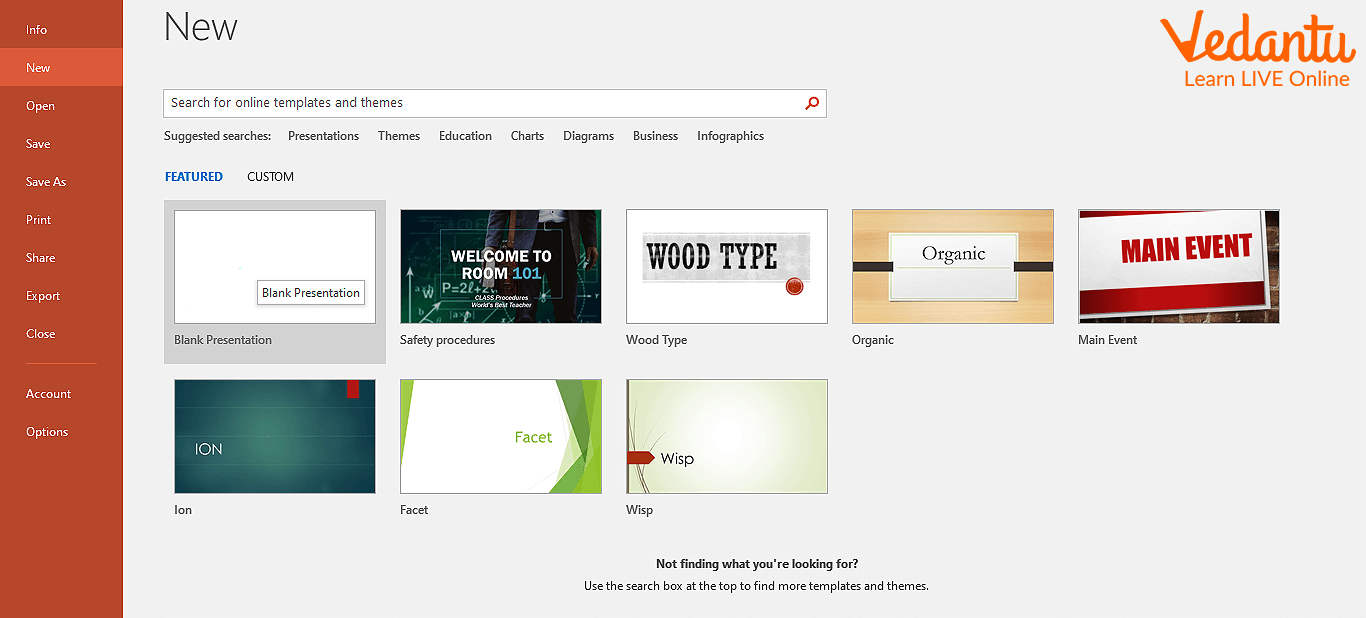
Creating a New Presentation
Users can start from a blank presentation or use a template.
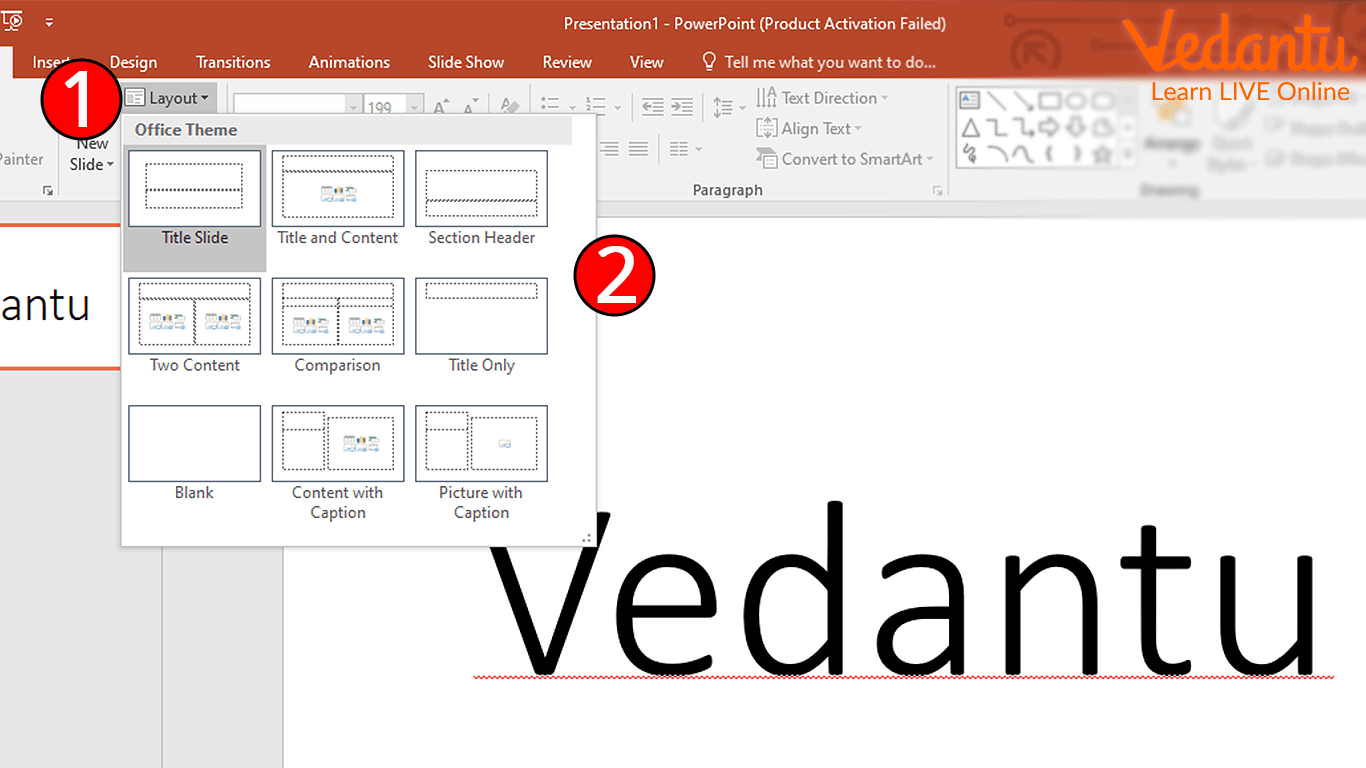
Selecting Slide Layout
Different layouts help organize content such as title slides, comparison slides, and content slides.
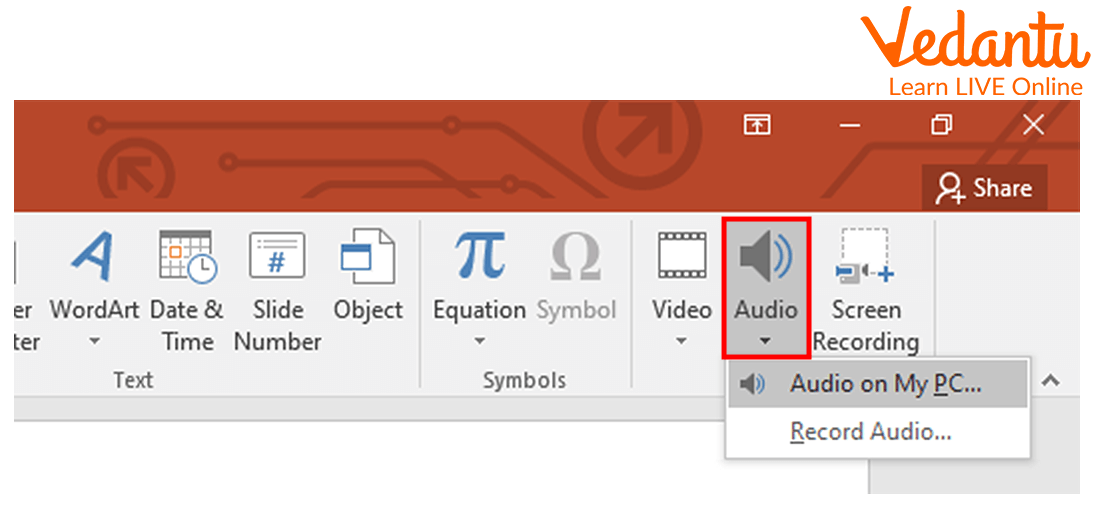
Inserting Audio
PowerPoint 2013 allows users to insert music or sound effects.

Users can select audio files from their computer.
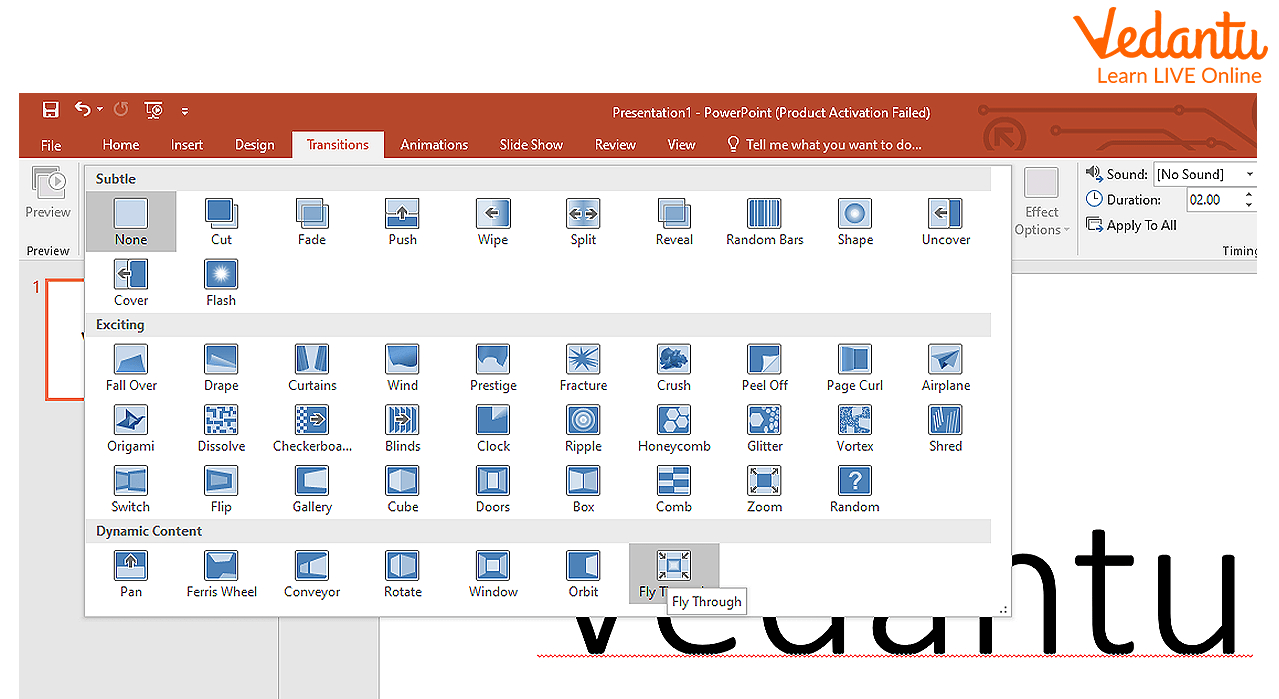
Applying Transition Effects
Transitions control how one slide changes to another.
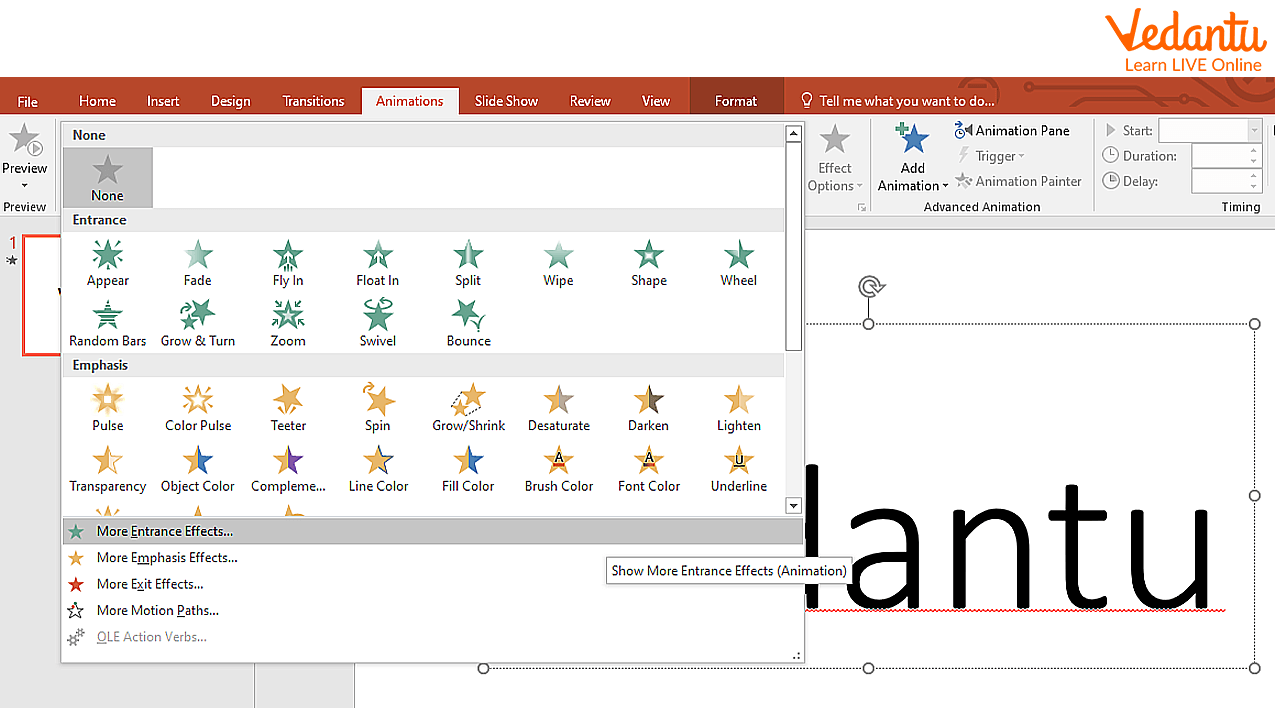
Adding Animation Effects
Animations are applied to text or objects within a slide.
Features and Characteristics
- User friendly graphical interface.
- Support for multimedia integration such as audio and video.
- Wide range of slide layouts and themes.
- Built in animation and transition effects.
- Compatibility with other Microsoft Office applications.
- Cloud integration with OneDrive.
Advantages
- Enhances visual communication.
- Easy to create and edit presentations.
- Supports multimedia content.
- Professional templates available.
- Useful for both educational and business purposes.
Disadvantages and Limitations
- Requires licensed software.
- Large multimedia files increase presentation size.
- Overuse of animations can distract the audience.
- Compatibility issues with older versions.
Applications and Use Cases
- Classroom teaching and student projects.
- Business meetings and corporate reports.
- Seminars and conferences.
- Training sessions and workshops.
- Marketing and product demonstrations.
Quick Facts About Microsoft PowerPoint 2013
| Feature | Details |
|---|---|
| Developed By | Microsoft Corporation |
| Release Year | 2013 |
| File Extension | .pptx |
| Platform Support | Windows |
| Used For | Creating digital presentations |
Microsoft PowerPoint 2013 is part of the Microsoft Office 2013 suite and is widely used for professional and educational presentations.
Interesting Facts About Microsoft PowerPoint 2013
- PowerPoint was originally developed in 1987 before being acquired by Microsoft.
- PowerPoint 2013 introduced improved presenter view features.
- It supports embedding videos directly into presentations.
- Cloud saving with OneDrive became more integrated in this version.
- It allows exporting presentations as PDF or video files.
- Millions of presentations are created daily using PowerPoint worldwide.
Conclusion
Microsoft PowerPoint 2013 is a powerful and user friendly presentation tool widely used in education and business. Understanding Microsoft PowerPoint 2013 in computer science helps learners develop digital communication skills and multimedia integration knowledge. With features like slide layouts, animations, transitions, and audio insertion, it enables users to create engaging presentations. Mastering this software enhances productivity and supports effective information sharing in the modern digital world.
FAQs on Microsoft PowerPoint 2013 Complete Guide for Students and Professionals
1. What is Microsoft PowerPoint 2013?
Microsoft PowerPoint 2013 is a presentation software developed by Microsoft that allows users to create slideshows for educational, business, and professional purposes.
- Part of the Microsoft Office 2013 suite
- Used to create slides with text, images, charts, animations, and multimedia
- Widely used in schools, colleges, and corporate environments
2. What are the main features of Microsoft PowerPoint 2013?
PowerPoint 2013 provides advanced presentation tools with improved design, animation, and multimedia support.
- Slide Master for consistent design
- Themes and templates for quick formatting
- Animations and transitions effects
- Support for audio, video, and images
- Presenter View for better presentation control
3. What are the main components of the PowerPoint 2013 interface?
The PowerPoint 2013 interface consists of several components that help users create and manage presentations efficiently.
- Ribbon with tabs like Home, Insert, Design
- Slides Pane for slide navigation
- Slide Area for editing content
- Notes Pane for speaker notes
- Status Bar for slide information and view options
4. How does Microsoft PowerPoint 2013 work?
Microsoft PowerPoint 2013 works by organizing content into slides that can include text, graphics, and multimedia, which are then displayed as a slideshow.
- Users create and format slides
- Add multimedia elements and animations
- Arrange slides in sequence
- Run the slideshow using Slide Show mode
5. What are the different types of views in PowerPoint 2013?
PowerPoint 2013 offers multiple presentation views to help in editing, organizing, and presenting slides.
- Normal View for creating and editing slides
- Slide Sorter View for rearranging slides
- Reading View for previewing presentations
- Slide Show View for full-screen presentation
- Notes Page View for adding speaker notes
6. What are the advantages and disadvantages of Microsoft PowerPoint 2013?
Microsoft PowerPoint 2013 offers powerful presentation tools but also has certain limitations depending on user needs.
- Advantages: Easy to use, rich multimedia support, professional templates, integration with Microsoft Office
- Disadvantages: Can become text-heavy, requires compatible software, large file sizes with multimedia
7. What are the applications and uses of PowerPoint 2013?
PowerPoint 2013 is widely used for creating visual presentations in education, business, and technical fields.
- Classroom teaching and academic projects
- Business meetings and reports
- Seminars and conferences
- Training materials and e-learning content
8. How is PowerPoint 2013 different from earlier versions like PowerPoint 2010?
PowerPoint 2013 introduced enhanced design tools, better multimedia support, and improved collaboration compared to PowerPoint 2010.
- Improved Presenter View
- Better widescreen (16:9) default format
- Enhanced video and audio editing features
- Integration with cloud services like OneDrive
9. What file formats are supported in Microsoft PowerPoint 2013?
PowerPoint 2013 supports multiple file formats for saving, opening, and exporting presentations.
- .pptx (default presentation format)
- .ppt (older version format)
- .pdf for document sharing
- .mp4 and .wmv for video export
- .ppsx for slideshow format
10. Why is Microsoft PowerPoint 2013 important for students and competitive exams?
Microsoft PowerPoint 2013 is important for students because it is commonly included in computer literacy courses, practical exams, and job interviews.
- Helps in project presentations and seminars
- Frequently asked in computer fundamentals exams
- Useful skill for office jobs and interviews
- Enhances digital communication and presentation skills
