









How to Create a Definition List in HTML Using dl dt and dd Tags
In web development, organizing content clearly is essential for readability and structure. One useful HTML feature for presenting terms and their explanations is the Definition List. The Creation Of Definition List in computer science refers to using specific HTML tags to display terms and their corresponding descriptions in a structured format. It is commonly used in glossaries, FAQs, technical documentation, and dictionaries on websites. Understanding how to create and use definition lists helps developers present information logically and improve both user experience and content clarity.
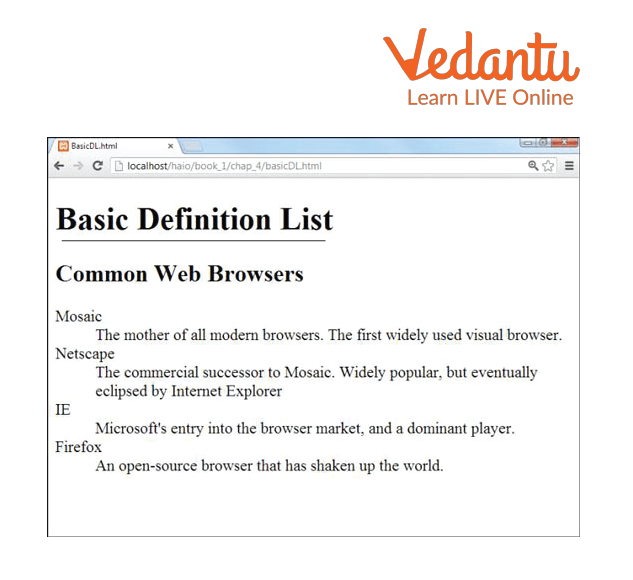
Definition and Meaning
Creation Of Definition List in computer science refers to the process of creating a structured list of terms and their descriptions using HTML tags. It is mainly used in web technologies to display paired information.
- Definition List - A list that contains terms and their explanations.
- <dl> tag - Defines the definition list container.
- <dt> tag - Specifies the term or name.
- <dd> tag - Provides the description of the term.
How It Works - Working Principle
The Creation Of Definition List working is based on pairing a term with its description using specific HTML tags. The browser automatically formats and displays the content in a readable structure.
- The list begins with the <dl> tag which acts as the container.
- Each term is defined using the <dt> tag.
- The explanation of the term is written inside the <dd> tag.
- The browser displays the term followed by an indented description.
- Multiple terms and descriptions can be added within the same <dl> block.
Types and Classification
Although there are no strict types of definition lists, they can be categorized based on usage:
- Single Term - Single Description - One term followed by one explanation.
- Single Term - Multiple Descriptions - One term with multiple related explanations.
- Multiple Terms - Single Description - Several related terms sharing one explanation.
- Glossary Style List - Commonly used for dictionaries and technical glossaries.
Syntax and Example
General Syntax
<dl>
   <dt>Term Name</dt>
   <dd>Description of the term</dd>
</dl>
Example
<dl>
   <dt>HTML</dt>
   <dd>HyperText Markup Language used to create web pages.</dd>

   <dt>CSS</dt>
   <dd>Cascading Style Sheets used for styling web pages.</dd>
</dl>
In this Creation Of Definition List example, each term is defined using the <dt> tag and its description is written using the <dd> tag inside the <dl> container.
Features and Characteristics
- Used to represent term-description pairs.
- Provides semantic meaning in HTML.
- Improves content readability and structure.
- Supports multiple descriptions for a single term.
- SEO friendly for glossary and informational content.
Advantages
- Organizes related information clearly.
- Improves accessibility and semantic structure.
- Easy to implement using simple HTML tags.
- Useful for glossaries, FAQs, and documentation.
Disadvantages / Limitations
- Limited styling without CSS.
- Not suitable for large structured data sets like tables.
- May not be ideal for non-descriptive list items.
Applications and Use Cases
- Creating online dictionaries and glossaries.
- Displaying technical terms and definitions.
- Writing FAQ sections in web pages.
- Documenting programming concepts and commands.
- Educational websites explaining key terminology.
Quick Facts About Creation Of Definition List
| Category | Details | Used For |
|---|---|---|
| Type | HTML List Element | Displaying terms and descriptions |
| Main Tags | <dl>, <dt>, <dd> | Structuring content |
| Platform | All Web Browsers | Web page formatting |
These quick facts highlight that the Creation Of Definition List in computer science is an essential HTML feature for structured content presentation.
Definition List vs Other HTML Lists
| Feature | Definition List | Ordered / Unordered List |
|---|---|---|
| Purpose | Term and description pairs | Items in sequence or bullets |
| Tags Used | <dl>, <dt>, <dd> | <ol>, <ul>, <li> |
| Numbering | No numbering | Can be numbered or bulleted |
Unlike ordered or unordered lists, a definition list focuses on explaining terms rather than simply listing items.
Interesting Facts About Creation Of Definition List
- Definition lists are part of the core HTML specification.
- They provide semantic meaning, improving search engine understanding.
- A single term can have multiple descriptions.
- Multiple terms can share one description.
- They are commonly used in educational and technical websites.
- Definition lists can be styled extensively using CSS.
Conclusion
The Creation Of Definition List is an important concept in HTML and web development. It helps present terms and explanations in a structured and meaningful way. By using the <dl>, <dt>, and <dd> tags correctly, developers can improve content clarity, accessibility, and organization. Understanding this concept is essential for building informative websites, glossaries, and educational content in computer science and web technology.


FAQs on Creation of Definition List in HTML with Syntax and Examples
1. What is a Definition List in HTML?
A Definition List in HTML is a structure used to display terms and their corresponding descriptions in a web page.
- Created using the <dl> tag
- Terms are defined with <dt>
- Descriptions are written using <dd>
- Commonly used in web development for glossaries and FAQs
2. What are the tags used to create a Definition List?
A Definition List in HTML is created using three main tags: <dl>, <dt>, and <dd>.
- <dl> defines the definition list container
- <dt> specifies the term or name
- <dd> provides the description or explanation
- Part of standard HTML5 syntax
3. How does a Definition List work in HTML?
A Definition List works by pairing terms with their descriptions using structured HTML tags.
- The browser reads the <dl> container
- Each <dt> is followed by one or more <dd> elements
- The layout is automatically formatted by the browser
- Often styled using CSS for better presentation
4. What is the syntax of a Definition List with an example?
The syntax of a Definition List includes the <dl>, <dt>, and <dd> tags arranged in a structured format.
- Basic syntax example:
- <dl> <dt>HTML</dt> <dd>HyperText Markup Language</dd> </dl>
- Widely used in web development and documentation pages
5. What are the common uses of a Definition List in web development?
A Definition List is commonly used to display structured term-description pairs in web applications and websites.
- Creating glossaries for technical terms
- Displaying FAQs
- Showing metadata like key-value pairs
- Documenting APIs and software features
6. What is the difference between Ordered List, Unordered List, and Definition List?
The main difference lies in how content is structured and displayed in HTML.
- <ol> creates a numbered list
- <ul> creates a bulleted list
- <dl> creates term-description pairs
- Used for different content structures in HTML web design
7. Can a Definition List have multiple descriptions for one term?
Yes, a single term in a Definition List can have multiple descriptions using multiple <dd> tags.
- One <dt> can be followed by multiple <dd>
- Useful for listing features or multiple meanings
- Supported in standard HTML5 specification
8. How can CSS be used to style a Definition List?
CSS can be applied to customize the layout and appearance of a Definition List in web design.
- Change spacing using margin and padding
- Style terms with font-weight or color
- Use display: grid or flexbox for alignment
- Improve UI in modern frontend development
9. What are the advantages of using a Definition List?
A Definition List provides semantic structure and improves content readability in web pages.
- Enhances semantic HTML
- Improves accessibility for screen readers
- Organizes structured data clearly
- Useful for documentation and educational content
10. Is a Definition List important for exams and interviews?
Yes, understanding Definition Lists is important for web development exams, coding interviews, and frontend development basics.
- Frequently asked in HTML and CSS interview questions
- Important for school and college Computer Science syllabus
- Tests knowledge of HTML structure and syntax
- Useful for practical web design projects
