








How Computers Are Used in Business Operations and Management
Computers have become an essential part of modern businesses, transforming how organisations manage data, communicate, make decisions, and deliver services. From small startups to multinational corporations, computers help automate tasks, improve accuracy, and increase productivity. In computer science, understanding the role of computers in business is important because it connects technology with real-world applications such as accounting, marketing, research, analytics, and security. Businesses rely on computer systems to store information, process transactions, and support strategic planning, making them a foundation of today’s digital economy.
Definition and Meaning
Using Computers in Business refers to the application of computer systems, software, and networks to perform, manage, and optimise business operations. It combines hardware, software, data, and communication technologies to support daily activities and long-term planning.
- Business Information Systems - Systems that collect, process, and store business data.
- Automation - Using computers to perform repetitive tasks automatically.
- Data Processing - Converting raw data into meaningful information.
- Digital Communication - Exchanging information electronically within and outside the organisation.
How It Works - Working Principle
The working of computers in business is based on the Input - Process - Output cycle. Data is entered into the system, processed using software applications, and converted into useful outputs such as reports, invoices, or analytics dashboards.
- Data Input - Business data such as sales figures, employee details, and customer records are entered using input devices.
- Processing - Software applications process the data using algorithms and predefined rules.
- Storage - Processed data is stored in databases or cloud storage for future use.
- Output Generation - The system produces reports, invoices, charts, and dashboards.
- Decision Support - Managers use the output to make informed decisions.
Types and Classification
Computers in business can be classified based on their purpose and application.
- Accounting Systems - Used for managing financial records, payroll, and taxation.
- Communication Systems - Used for emails, video conferencing, and internal communication.
- Management Information Systems - Provide reports and analytics for decision making.
- Customer Relationship Management Systems - Manage customer data and interactions.
- Enterprise Resource Planning Systems - Integrate multiple business functions into one platform.
Components and Structure
The use of computers in business involves several hardware and software components working together.
- Hardware - Computers, servers, printers, scanners, and networking devices.
- Software - Accounting software, database systems, office tools, and analytics applications.
- Database - Stores structured business information.
- Network Infrastructure - Enables communication and data sharing.
- Security Systems - Protect business data from unauthorised access.
Features and Characteristics
- High Speed Processing for quick transaction handling.
- Data Accuracy reduces human errors.
- Large Storage Capacity for business records.
- Automation of repetitive tasks.
- Connectivity through internet and intranet systems.
- Scalability to support business growth.
Advantages
- Improves efficiency and productivity.
- Provides accurate and reliable data.
- Supports better decision making through analytics.
- Reduces paperwork and manual effort.
- Enhances communication within the organisation.
Disadvantages / Limitations
- High initial setup and maintenance cost.
- Risk of cybersecurity threats and data breaches.
- Dependence on technology and electricity.
- Requires training and skilled personnel.
Applications and Use Cases
Computers in Communication

- Emails, video conferencing, and instant messaging.
- Collaboration tools for remote work.
Computers for Software Development

- Designing business applications and websites.
- Developing enterprise software solutions.
Computers for Accounting

- Payroll processing and tax calculation.
- Financial reporting and auditing.
Computers for Storage
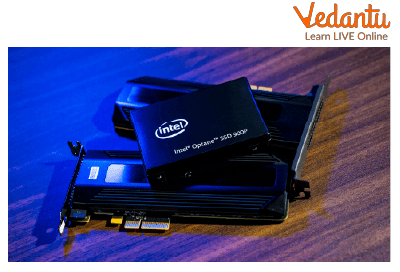
- Cloud storage and database management.
- Backup and recovery systems.
Computers Used for Documents

- Creating reports, letters, and presentations.
- Document management systems.
Computers in Education

- Corporate training and e-learning platforms.
- Skill development programs.
Computers Used for Research Purpose

- Market research and data analysis.
- Product development and innovation.
Computers Providing Accessibility
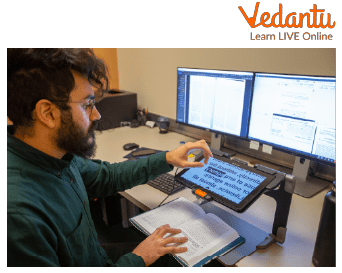
- Assistive technologies for employees with disabilities.
- Voice recognition and screen readers.
Computers for Analytics

- Business intelligence and data visualization.
- Predictive analysis for strategic planning.
Computers Provide Security

- Data encryption and firewall protection.
- Access control and authentication systems.
Quick Facts About Using Computers In Business
| Category | Details |
|---|---|
| Type | Application of Computer Science in Business |
| Used For | Data Processing, Communication, Accounting, Analytics |
| Key Technologies | Databases, Cloud Computing, Networking, Security Systems |
| Primary Benefit | Improved Efficiency and Decision Making |
These quick facts highlight the importance of computers in modern business environments and their role in improving operational performance.
Interesting Facts About Using Computers In Business
- Most businesses rely on cloud computing for scalable storage.
- Data driven companies are more likely to make profitable decisions.
- Automation reduces manual errors significantly.
- Cybersecurity investment is increasing every year.
- Remote work became widely possible due to business computing systems.
- Artificial Intelligence tools are now integrated into business analytics.
Conclusion
Using Computers in Business plays a crucial role in modern organisations by improving efficiency, accuracy, and decision making. From accounting and communication to analytics and security, computers support nearly every business function. Understanding this topic in computer science helps students connect theoretical knowledge with practical industry applications. As technology continues to evolve, businesses will increasingly depend on advanced computer systems to remain competitive and innovative in the digital world.
FAQs on Using Computers In Business Explained for Students and Professionals
1. What is Using Computers in Business?
Using Computers in Business refers to the application of computer systems, software, and digital technologies to manage operations, data, communication, and decision-making processes in organizations.
- Includes hardware such as desktops, servers, and networking devices
- Uses business software like accounting systems, databases, and ERP tools
- Supports automation, data processing, and digital communication
2. How do computers work in a business environment?
Computers in business environments work by performing input, processing, storage, and output operations to manage business data efficiently.
- Input through keyboards, scanners, and online forms
- Processing using business applications and algorithms
- Storage in databases or cloud systems
- Output as reports, invoices, dashboards, or analytics
3. What are the main applications of computers in business?
Computers are widely used in business for automation, communication, financial management, and data analysis.
- Accounting and payroll systems
- Customer Relationship Management (CRM)
- Inventory management
- E-commerce and web development
- Data analytics and business intelligence
4. What types of software are used in business computing?
Business computing uses different types of application software and system software to support organizational operations.
- Accounting software like Tally or QuickBooks
- Database Management Systems (DBMS) such as MySQL and Oracle
- Enterprise Resource Planning (ERP) systems like SAP
- Office productivity tools like MS Excel and Word
5. What are the advantages of using computers in business?
Using computers in business improves efficiency, accuracy, communication, and data management.
- Faster data processing and report generation
- Improved accuracy and reduced human errors
- Better data storage and retrieval
- Enhanced online collaboration and communication
6. What are the disadvantages or challenges of business computing?
Although beneficial, business computing has challenges related to security, cost, and technical dependency.
- Risk of cybersecurity threats and data breaches
- High initial setup and maintenance cost
- Dependency on network infrastructure and electricity
- Need for skilled IT professionals
7. How are databases used in business operations?
Databases are used in business to store, manage, and retrieve structured data efficiently using a Database Management System (DBMS).
- Store customer, sales, and inventory data
- Support SQL queries for reporting and analysis
- Ensure data integrity and security
- Enable integration with web and cloud applications
8. What is the role of cloud computing in business?
Cloud computing allows businesses to access software, storage, and computing resources over the internet instead of local servers.
- Provides Software as a Service (SaaS) like Google Workspace
- Enables remote work and collaboration
- Offers scalable storage and backup solutions
- Reduces hardware maintenance costs
9. How is cybersecurity important in business computing?
Cybersecurity protects business data, networks, and systems from unauthorized access and cyber attacks.
- Uses firewalls, antivirus software, and encryption
- Prevents data theft and financial fraud
- Ensures compliance with data protection regulations
- Maintains customer trust and business reputation
10. Why is using computers in business important for exams and interviews?
Understanding the use of computers in business is important for academic exams, competitive tests, and job interviews in IT and management fields.
- Common topic in Computer Science and IT syllabus
- Asked in interviews about business applications and software tools
- Helps in practical knowledge of databases, networks, and operating systems
- Supports career roles in IT support, data analysis, and software development
