









What is an Intranet How it Works and Key Features
An Intranet is a private network used within an organisation to share information, resources, and communication tools securely among employees. Unlike the Internet, which is accessible to everyone, an intranet is restricted to authorised users within a company, school, or institution. In computer science, intranet systems play an important role in networking, data sharing, and internal communication. They help organisations manage documents, collaborate efficiently, and maintain secure internal operations using web technologies and network protocols.
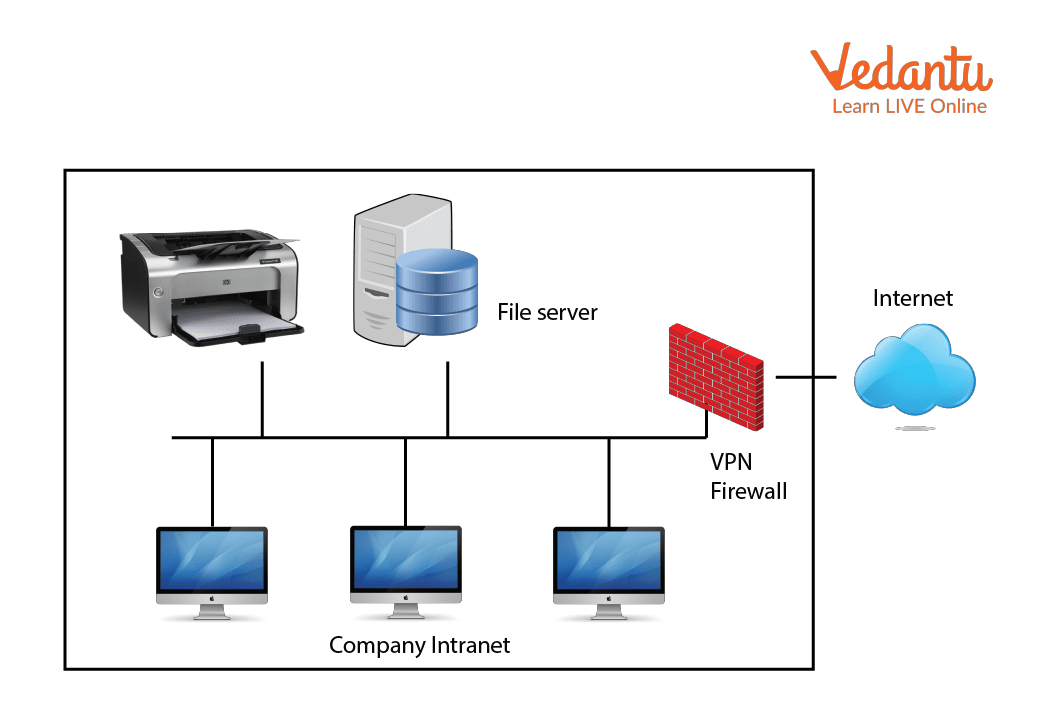
Definition and Meaning
Intranet definition: An intranet is a private computer network that uses Internet technologies such as TCP/IP, web browsers, and servers to share organisational information securely within a company or institution.
- Private Network: Accessible only to authorised users inside an organisation.
- Internal Communication: Used for sharing notices, policies, and updates.
- Web Based Interface: Often accessed through web browsers like Chrome or Edge.
- Security Controlled: Protected by firewalls, passwords, and authentication systems.
How It Works - Intranet Working
The intranet working process is similar to the Internet, but it operates within a closed network. It uses standard networking technologies while restricting access to internal users only.
- A server is set up inside the organisation to host websites, databases, and applications.
- Employees connect to the network through LAN or secure Wi-Fi.
- Users log in using authentication credentials such as username and password.
- The server processes requests and sends the required data back to the user.
- Security systems like firewalls and encryption ensure safe communication.
The entire system relies on TCP/IP protocols, web servers, databases, and client devices such as computers or mobile phones.

Types and Classification
There are different intranet types based on structure and purpose.
- Centralised Intranet: Managed from a single main server. Suitable for small organisations.
- Decentralised Intranet: Different departments manage their own sections.
- Cloud Based Intranet: Hosted on cloud platforms for remote access.
- Social Intranet: Includes collaboration tools like chats, forums, and discussion boards.
Components and Structure
An intranet system consists of several important components that work together.
- Web Server: Hosts internal websites and applications.
- Database Server: Stores organisational data and records.
- Client Devices: Computers, laptops, or mobile devices used by employees.
- Network Infrastructure: Routers, switches, LAN cables, and Wi-Fi systems.
- Security Systems: Firewalls, antivirus software, and authentication tools.
Features and Characteristics
- Secure and restricted access.
- Supports document sharing and file management.
- Real time communication tools.
- Centralised data storage.
- User authentication and role based permissions.
- Integration with enterprise software like HR and ERP systems.
Advantages
- Improved Communication: Easy sharing of announcements and updates.
- Data Security: Controlled access reduces data leakage risks.
- Cost Effective: Reduces paperwork and printing costs.
- Better Collaboration: Teams can work on shared documents.
- Centralised Management: Easy control over internal information.
Disadvantages and Limitations
- High initial setup cost.
- Requires regular maintenance and updates.
- Limited access outside the organisation without VPN.
- Security risks if not properly configured.
Applications and Use Cases
- Corporate Offices: Sharing policies, employee directories, and project files.
- Educational Institutions: Providing study materials and announcements.
- Healthcare Organisations: Managing patient records internally.
- Government Departments: Secure document exchange and internal communication.
Quick Facts About Intranet
| Category | Details | Example |
|---|---|---|
| Type | Private Network | Company Network |
| Protocol Used | TCP/IP | HTTP, HTTPS |
| Used For | Internal Communication | Employee Portal |
| Security | Firewall Protected | Password Login |
These quick facts highlight the core technical aspects of an intranet in computer science.
Intranet vs Internet
| Feature | Intranet | Internet |
|---|---|---|
| Access | Restricted | Public |
| Users | Organisation Members | Global Users |
| Security | High | Moderate |
| Purpose | Internal Communication | Global Information Sharing |
While both use similar technologies, an intranet is limited to internal use, whereas the Internet connects users worldwide.
Key Terms and Glossary
| Term | Meaning |
|---|---|
| Firewall | Security system that controls network traffic |
| LAN | Local Area Network within a limited area |
| Authentication | Process of verifying user identity |
| Server | Computer that provides services to other computers |
Interesting Facts About Intranet
- The concept of intranet became popular in the 1990s.
- It uses the same technologies as the Internet but with restricted access.
- Large companies use VPNs to access intranets remotely.
- Modern intranets include collaboration tools similar to social media platforms.
- Cloud based intranets allow secure remote working.
- Intranets improve productivity by centralising organisational information.
Conclusion
An Intranet in computer science is a secure internal network that enables organisations to share information efficiently and safely. It combines networking technologies, servers, and security systems to support communication and collaboration. Understanding the intranet definition, working, types, features, and applications helps students grasp key networking concepts. Intranets continue to evolve with cloud integration and advanced security, making them an essential part of modern digital infrastructure.
FAQs on Intranet in Computer Networks Complete Guide for Students
1. What is an Intranet in Computer Networks?
An Intranet is a private network that uses Internet technologies to securely share information, resources, and applications within an organization.
- Accessible only to authorized users
- Uses TCP/IP, HTTP, and web servers
- Supports internal communication and collaboration
- Common in schools, companies, and government offices
2. How does an Intranet work?
An Intranet works by using standard network protocols and web technologies within a secured local network environment.
- Users log in using authentication credentials
- Data is stored on internal servers or cloud infrastructure
- Access is controlled through firewalls and access control mechanisms
- Browsers are used to access internal web applications
3. What are the main components of an Intranet?
The core components of an Intranet include hardware, software, and network infrastructure that enable internal communication.
- Web servers and application servers
- Database management systems
- Network devices such as routers and switches
- Security tools like firewalls and authentication systems
4. What are the types of Intranet?
An Intranet can be classified based on its structure and usage within an organization.
- Corporate Intranet for enterprise communication
- Departmental Intranet for specific teams
- Cloud-based Intranet hosted on cloud computing platforms
- Social Intranet with collaboration tools
5. What are the advantages of using an Intranet?
An Intranet improves internal communication, data sharing, and organizational productivity.
- Secure information exchange
- Centralized document management
- Cost-effective communication system
- Improved collaboration using internal web applications
6. What are the disadvantages of an Intranet?
Despite its benefits, an Intranet has certain limitations related to maintenance and security.
- Requires regular maintenance and updates
- Risk of internal cybersecurity threats
- Implementation cost for hardware and software
- Needs user training for effective use
7. What is the difference between Internet, Intranet, and Extranet?
The Internet, Intranet, and Extranet differ mainly in accessibility and user scope.
- Internet is a public global network accessible to everyone
- Intranet is a private network within an organization
- Extranet allows limited external access to partners or clients
8. What are the applications of an Intranet in organizations?
An Intranet is widely used for internal communication, data management, and enterprise software integration.
- Employee portals and HR management systems
- Project management and collaboration tools
- Internal email and messaging systems
- Knowledge base and document repositories
9. How is security maintained in an Intranet?
Security in an Intranet is maintained through authentication, encryption, and network security mechanisms.
- User authentication and role-based access control
- Firewalls and intrusion detection systems
- Data encryption protocols like HTTPS
- Regular security audits and software updates
10. Why is Intranet important for exam and interview preparation?
Understanding Intranet is important for computer science exams and technical interviews because it is a fundamental concept in computer networks.
- Frequently asked in networking theory questions
- Important for understanding enterprise network architecture
- Helps in differentiating Internet, Intranet, and Extranet
- Relevant for roles in IT support, system administration, and cybersecurity
